Migrando do BigQuery para o Databricks: Guia de Ferramentas
Quais ferramentas ajudam a migrar do BigQuery para o Databricks em 2026: conversão de SQL, transferência histórica e sincronização.
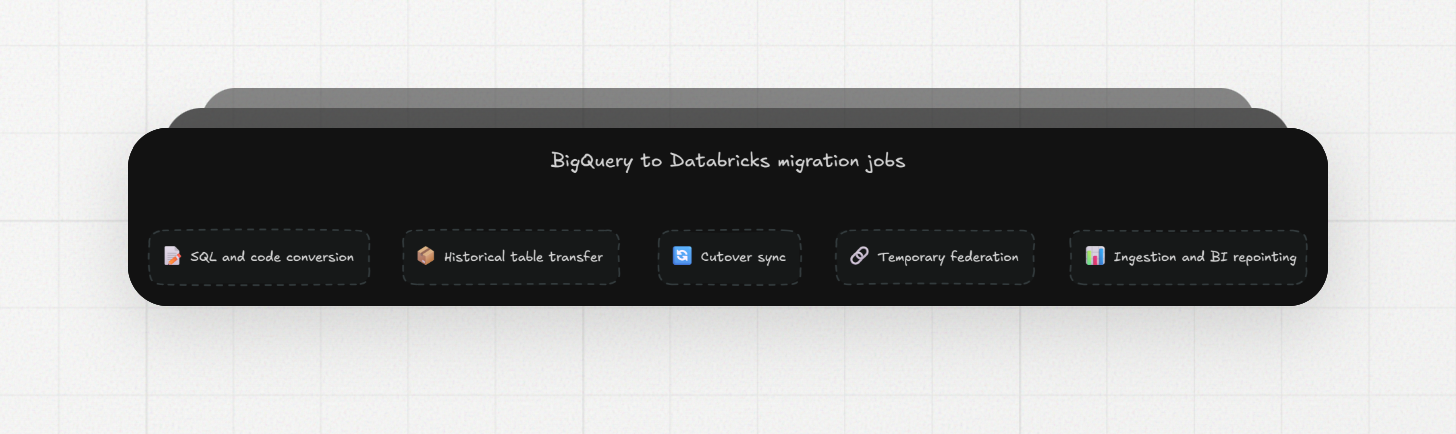
Migrar um data warehouse do BigQuery pro Databricks significa converter SQL, copiar histórico, manter os dois lados sincronizados durante o cutover, e reapontar os pipelines e dashboards em torno do warehouse. Cada um desses trabalhos tem ferramentas diferentes. Este guia nomeia todas, junto com os limites que decidem entre elas: tamanhos de arquivo de exportação, precisão de tipos, e como a sincronização funciona quando a origem é o BigQuery.
Quais ferramentas ajudam em cada parte da migração?
O Databricks Lakebridge converte o SQL, e uma exportação nativa ou um conector gerenciado do Fivetran ou Airbyte move as tabelas históricas e mantém a sincronização rodando durante o cutover. O Lakehouse Federation cobre a coexistência, e a Erathos reaponta os pipelines de ingestão pro Databricks.
Trabalho | O que cobre | Ferramentas |
|---|---|---|
Conversão de SQL e código | Traduzir queries, jobs agendados e procedures pro Databricks SQL | Databricks Lakebridge |
Transferência de dados históricos | Copiar as tabelas que você já tem, uma única vez | Exportação do BigQuery pro Cloud Storage mais carga no Databricks, Fivetran, Airbyte |
Sincronização de cutover | Manter o Databricks atualizado enquanto os dois warehouses rodam | Fivetran, Airbyte, Estuary |
Federação temporária | Consultar tabelas do BigQuery a partir do Databricks antes delas migrarem | Databricks Lakehouse Federation |
Reapontamento de ingestão e BI (business intelligence) | Apontar pipelines de origem e dashboards pro Databricks | Erathos pra ingestão, trabalho específico por ferramenta pro BI |
Suporte a BigQuery como origem numa ferramenta significa que ela consegue copiar os dados da tabela. Tradução de SQL, validação e cutover de BI são trabalhos separados, e escolher um conector resolve só uma linha desta tabela.
O Databricks consegue consultar o BigQuery enquanto migramos?
Sim. O Lakehouse Federation roda queries federadas nos dados do BigQuery através de uma conexão Unity Catalog e um catálogo externo, então o Databricks consegue ler tabelas que ainda não migraram.
A configuração precisa de uma service account do Google com os papéis BigQuery User e BigQuery Data Viewer. Do lado do Databricks, os clusters precisam do Databricks Runtime 16.1 ou superior, com modo de acesso standard ou dedicado, e os SQL warehouses precisam ser pro ou serverless.
Dois limites importam pra uma migração. Views e tabelas externas são sempre materializadas: o BigQuery roda a view e escreve o resultado antes do Databricks ler, o que adiciona cobranças de computação do BigQuery a cada query. E colunas INTERVAL do BigQuery não são suportadas, então tabelas com elas precisam de outro caminho.
A federação consulta o BigQuery onde ele está, então as tabelas ainda precisam de um job de cópia pra virarem tabelas Delta. O papel dela numa migração é coexistência: dashboards que já estão no Databricks conseguem fazer join com tabelas que ainda não migraram, e você consegue comparar uma tabela migrada com sua origem no BigQuery numa única query.
Qual ferramenta move os dados históricos?
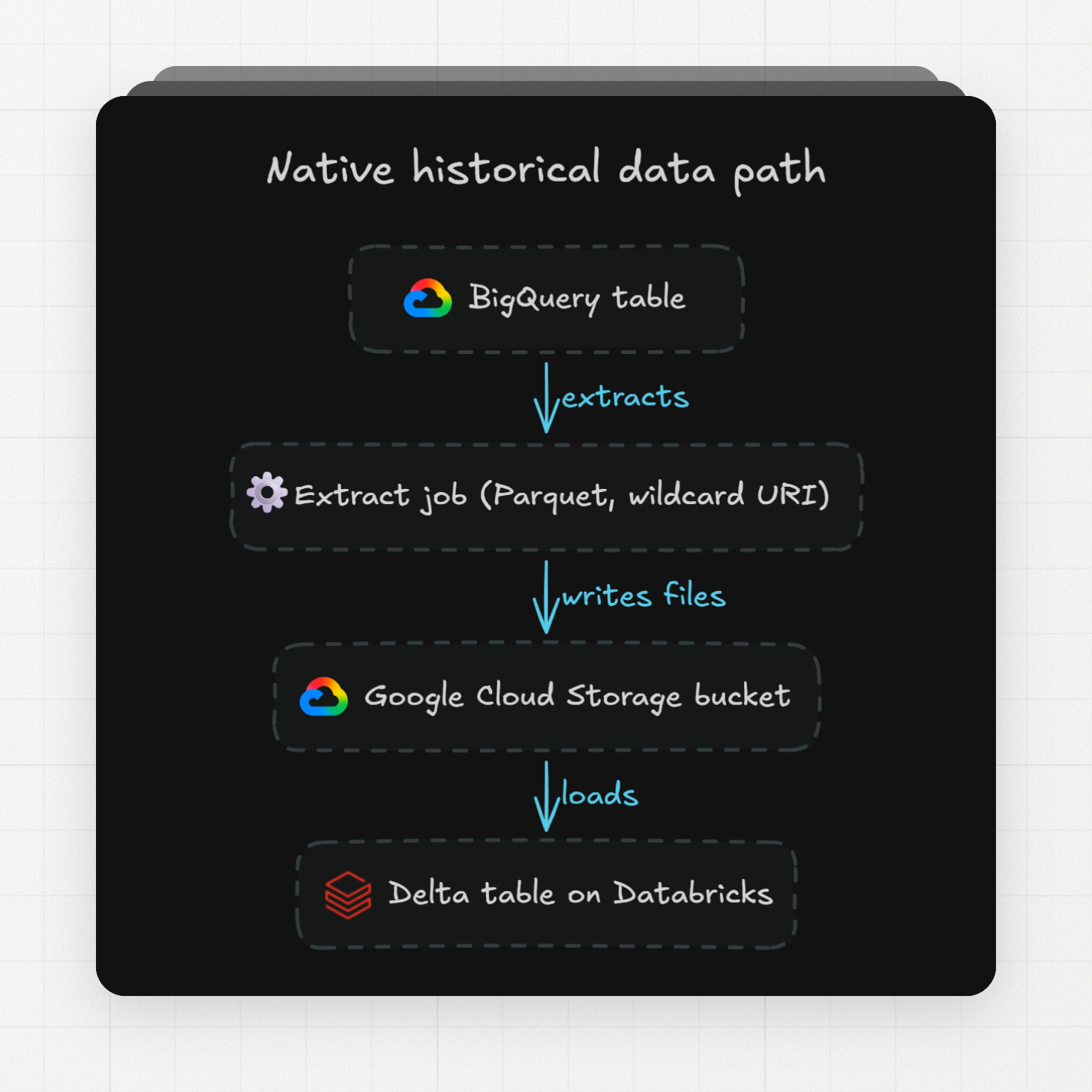
Um job de extração do BigQuery pro Google Cloud Storage em Parquet, seguido de uma carga em tabelas Delta, move dados históricos sem cobrança de exportação, porque exportações em batch usam o pool de slots compartilhado gratuito. Fivetran e Airbyte fazem a mesma transferência como um serviço gerenciado.
Um job de extração escreve até 1 GB por arquivo, então qualquer tabela real precisa de uma URI com wildcard que divide a saída em vários arquivos. Parquet e Avro preservam campos aninhados e repetidos, enquanto CSV não consegue guardá-los. O limite padrão de extração é 50 TiB por projeto por dia, e o bucket de destino precisa estar na mesma localização do dataset.
Dois detalhes pra planejar. Linhas carregadas enquanto um job de extração está rodando ficam de fora dessa exportação, então o horário do snapshot marca onde a sincronização de cutover precisa começar. E em exportações Parquet, uma coluna BIGNUMERIC sai como DECIMAL(76, 38), enquanto colunas JSON saem como strings, então a carga nas tabelas Delta precisa lidar com os dois casos.
O conector do Fivetran pro BigQuery lê tabelas standard através da Storage Read API. Uma importação de tabela que roda por mais de 6 horas falha, e o Fivetran recomenda desmarcar tabelas acima de 1 TB, então as maiores tabelas favorecem a exportação nativa. Tabelas do BigQuery não têm chaves primárias, então o Fivetran adiciona uma coluna gerada chamada _fivetran_id. A origem do Airbyte roda sincronizações full refresh e incrementais de tabelas e views.
Pergunta | Exportação e carga nativa | Conector gerenciado |
|---|---|---|
Custo | Exportação em batch gratuita; você paga Cloud Storage e computação do Databricks | Cobrança da ferramenta em cima: Fivetran por monthly active rows, Estuary por GB movido |
Tabelas grandes | 50 TiB por projeto por dia por padrão | Fivetran recomenda desmarcar tabelas acima de 1 TB |
Fidelidade de tipos | Você controla através do schema Parquet | Cada ferramenta aplica seu próprio mapeamento (veja a seção de tipos) |
Mudanças contínuas | A exportação é um snapshot; a sincronização é separada | Sincronização incremental inclusa |
Como mantemos o Databricks sincronizado com o BigQuery durante o cutover?
Fivetran, Airbyte e Estuary mantêm o Databricks sincronizado consultando o BigQuery num agendamento, usando colunas de cursor ou varreduras completas de tabela. Nenhum deles faz change data capture baseado em log (ler o log de mudanças do banco em vez de consultá-lo) a partir do BigQuery, e cada ciclo de sincronização roda em cima da computação do BigQuery até o dia do cutover.
A sincronização incremental do Airbyte segue um campo de cursor que precisa sempre crescer e nunca ser nulo, e sua documentação recomenda um cursor que combine com o particionamento da tabela. Sincronizações frequentes aumentam o uso de slots do BigQuery. O Fivetran detecta mudanças em tabelas standard com Time Travel, que varre a tabela inteira; views sincronizam via Teleport, que também varre a tabela inteira.
O conector do BigQuery da Estuary roda queries periódicas contra as tabelas com colunas de cursor. Do lado do Databricks, ela aplica as mudanças através de um Unity Catalog Volume com um atraso de sincronização padrão de 30 minutos.
Ferramenta | Detecção de mudanças | O que observar |
|---|---|---|
Airbyte | Coluna de cursor por tabela | O cursor precisa sempre crescer e nunca ser nulo; sincronizações frequentes aumentam o uso de slots |
Fivetran | Time Travel ou Teleport | Os dois varrem a tabela inteira; cobrado por monthly active rows, com 14 dias grátis por nova conexão |
Estuary | Queries periódicas por cursor | Atraso de sincronização padrão de 30 minutos; US$ 0,50 por GB movido mais US$ 0,14 por hora de conector |
A escolha do cursor é a principal decisão de design aqui. É um timestamp ou ID crescente que existe em toda tabela que você sincroniza. Tabelas sem um caem pra full refreshes, e cada um desses é uma varredura completa cobrada pelo BigQuery.
Como os tipos de dados do BigQuery mapeiam pro Databricks?
A maioria dos tipos do BigQuery tem uma correspondência direta no Databricks; os que valem testar primeiro são BIGNUMERIC, DATETIME, JSON e campos aninhados. O BIGNUMERIC guarda até 76 dígitos de precisão, enquanto o DecimalType do Spark para em 38, então valores de alta precisão não sobrevivem ao mapeamento padrão.
É assim que o Lakehouse Federation lê os tipos do BigQuery:
Tipo no BigQuery | Tipo Spark no Databricks |
|---|---|
INT64 | LongType |
FLOAT64 | DoubleType |
NUMERIC, BIGNUMERIC | DecimalType (padrão DecimalType(38, 38) pra BIGNUMERIC) |
BOOL | BooleanType |
BYTES | BinaryType |
DATE | DateType |
DATETIME | TimestampNTZType (StringType no Databricks Runtime 16.4 até 17.x) |
TIMESTAMP | TimestampType por padrão; TimestampNTZType com preferTimestampNTZ |
STRING, ARRAY, STRUCT, JSON, GEOGRAPHY | VarcharType |
INTERVAL | Não suportado |
Os conectores mapeiam de forma diferente. O Fivetran transforma colunas ARRAY, STRUCT e JSON em STRING. O Airbyte mantém arrays e structs como arrays e objetos, mas mapeia DATE, DATETIME, TIMESTAMP e TIME pra String, e seu destino Databricks armazena números como DECIMAL(38, 10).
A mesma tabela chega com tipos diferentes dependendo do caminho. Um bom primeiro teste é mover uma tabela do pior caso, aquela com BIGNUMERIC, JSON e campos aninhados, pelo caminho escolhido, e comparar os schemas dos dois lados antes de agendar o resto.
O Lakebridge consegue converter nosso SQL do BigQuery?
O Databricks diz que o Lakebridge automatiza até 80% das tarefas de migração, com um Analyzer pra avaliação, um Converter que transforma scripts SQL legados, stored procedures e workflows ETL (extract, transform, load) em Databricks SQL ou Spark SQL, e um Validator pra reconciliação. É gratuito pra clientes e parceiros Databricks.
A lista de origens publicada nomeia Teradata, Snowflake, Oracle e SQL Server entre mais de 10 warehouses suportados, com mais conectores em private preview. O BigQuery está ausente dessa lista, então eu confirmaria a cobertura de dialeto com o Databricks antes de planejar a conversão de SQL em cima disso. O motor de conversão veio da aquisição da BladeBridge em fevereiro de 2025, que cobria análise e conversão de código em mais de 20 warehouses e ferramentas ETL.
Seja lá o que o conversor cobrir, o resto ainda precisa de uma passada manual: queries agendadas, funções definidas pelo usuário, e scripts que chamam funções exclusivas do BigQuery.
O que muda no custo depois da mudança?
O BigQuery on-demand cobra US$ 6,25 por TiB escaneado, com o primeiro TiB grátis a cada mês; o preço por capacidade cobra por slot-hour em vez disso. O Databricks cobra a computação em DBUs (Databricks Units), precificadas por SKU (o produto de computação específico) e nuvem. As unidades não têm conversão direta, então a estimativa real de custo é uma prova de conceito com suas próprias queries mais pesadas.
O Databricks publica o histórico de preços por SKU na tabela system.billing.list_prices, então depois de um trial você consegue ler quanto cada workload custou, em vez de modelar isso.
A própria janela de migração tem custos no BigQuery. Um job de extração processa de graça, enquanto o EXPORT DATA roda como uma query e cobra pelos bytes escaneados. Sincronizações por cursor e varreduras de Time Travel também rodam contra o BigQuery a cada ciclo, então uma janela longa de execução em paralelo mantém as duas faturas abertas.
O que acontece com os pipelines que carregam o BigQuery hoje?
Os pipelines que carregam o BigQuery a partir dos seus bancos de dados e ferramentas SaaS também precisam de um novo destino, e reapontá-los é uma frente de trabalho própria. A Erathos conecta mais de 100 fontes de dados ao Databricks, e por fonte você escolhe cargas em batch, cargas incrementais por cursor, ou change data capture.
Pipelines pro destino Databricks rodam de forma incremental por padrão. A conexão pede um hostname de servidor, um caminho HTTP, um nome de catálogo e um personal access token ou OAuth, em qualquer instância Databricks na AWS, Azure ou Google Cloud. Durante cada job, a Erathos coloca os dados extraídos em staging num bucket temporário na nuvem, carrega com um comando COPY ou equivalente, e apaga os arquivos temporários.
Durante a janela de execução em paralelo, o pipeline antigo continua carregando o BigQuery enquanto o novo carrega o Databricks, então os dois warehouses ficam atualizados e os dashboards podem migrar um de cada vez. A integração com Databricks tem um teste gratuito de 14 dias. Pra times que mantêm pipelines em Python, o destino Databricks do dlt carrega Parquet através de um bucket de staging no S3, Azure Blob Storage ou Google Cloud Storage.
Como validamos e reapontamos as ferramentas de BI sem um cutover de uma vez só?
A ordem de cutover que evita surpresas: copiar o histórico, iniciar a sincronização, provar a paridade, reapontar as ferramentas de BI uma de cada vez, e só desligar a ingestão do BigQuery por último.
- Reconcilie toda tabela migrada. O Lakebridge inclui um Validator pra reconciliação entre origem e destino; contagem de linhas e agregados de coluna por tabela são a checagem básica.
- Rode suas queries agendadas nos dois warehouses por um ciclo completo e compare os resultados. O SQL convertido mostra seus problemas aqui, com dados reais.
- Fixe o limite de atualidade. O horário do snapshot de exportação de cada tabela é o ponto que a sincronização precisa cobrir, e uma tabela está pronta quando o Databricks combina com o BigQuery a partir desse ponto.
- Reaponte as conexões de BI um dashboard de cada vez. A federação deixa o Databricks ler as tabelas que ainda não migraram, então um estado parcialmente migrado ainda funciona.
- Desligue a ingestão do BigQuery e os conectores de sincronização por último, depois que os dashboards já rodaram no Databricks sem precisar voltar atrás.
Pronto pra reapontar seus pipelines de ingestão? Teste a Erathos grátis por 14 dias e carregue o Databricks a partir de mais de 100 fontes.