

Your product's integrations, without building any
If your product needs your customers' data, run the Erathos API behind it. You connect each customer's sources from code, Erathos extracts and loads, and the data lands in your product's database ready for it to use.
100+ ready-made connectors, and the custom connector for the rest.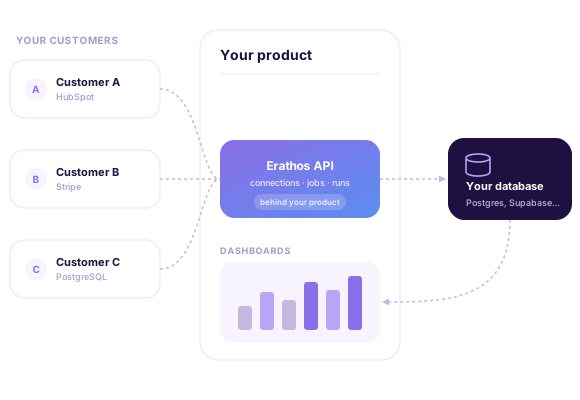
Trusted by data teams that process billions of rows every month














Each customer connects their own sources, inside your product
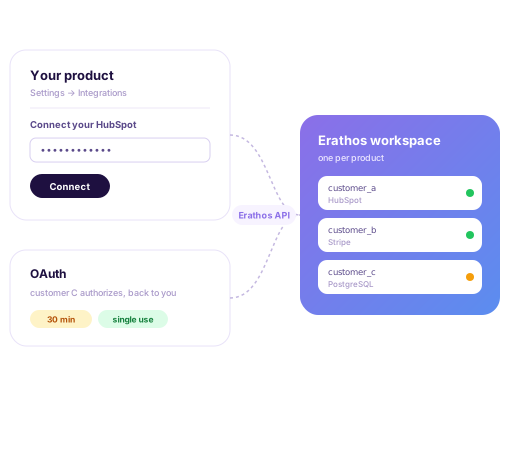
Every connection lives in one workspace, your product's. For each customer, your code creates the connection through the API with whatever name makes sense to you, such as the customer's ID.
Credentials come in through your product's own interface and go to Erathos through the API. For OAuth sources, the API returns a single-use authorization link: the customer authorizes and comes back to your product with the result.
Set up and monitor every customer without opening the platform
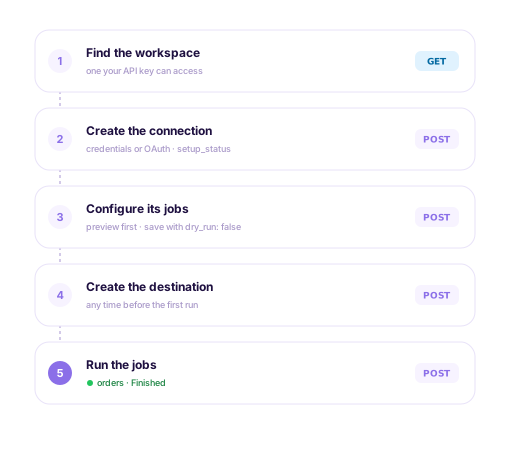
Your product picks each connection's tables and endpoints, frequency and update type through the API, with a preview before saving.
Each connection reports which setup step it is on, and every run can be triggered and tracked through the same API. Your code always knows what to do next.
Your product knows when each customer's data has landed
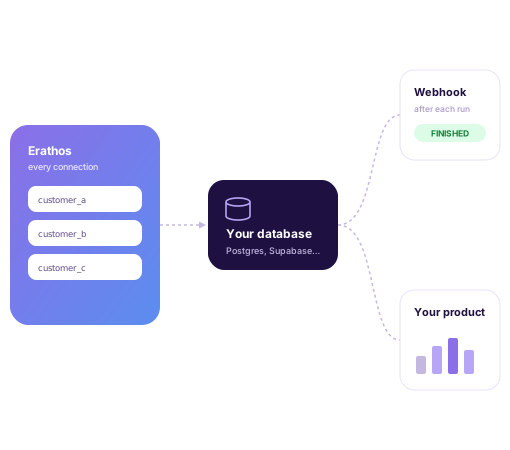
Data from every connection lands in the workspace's destination: the database your product already uses, such as PostgreSQL, Supabase or SQL Server, or a warehouse if that's your setup.
After each run, a webhook, created through the API itself, notifies your system with the run's details. Rules decide when it fires, for example only for runs that finished successfully and loaded new rows.
Whoever loves data, loves Erathos.
“Every new source implementation, if I had to do it myself, would take about two or three months. With Erathos, it's done in a few hours. I don't need the skills of a data engineer to generate real value from the company's data.”


“Erathos revolutionized data management at WE. By integrating multiple SaaS tools into a single DW, our technical team now focuses on the core business. We implemented dashboards with insights across every area, enriching our organizational culture and improving our decision-making.”


“We used to have a lot of rework, and now we don't. It's more efficient to work this way. If it's not your core business, hire Erathos. Spend your time modeling your own domain, not someone else's.”

“If I didn't have this infrastructure, I'd need three or four people to do what Erathos does today. I was able to generate real value from my data with a much leaner setup than I thought I'd need. That's the core of building a data-driven culture: the team only uses data when they can trust it.”

“Erathos brought a practical turnaround at CCM. We were able to integrate financial systems, CRM, and processes with BigQuery in just a few clicks, with no technical team required. That gave us a reliable data warehouse that powers automations, dashboards, and even our customer service bots.”


“The robustness and efficiency of Erathos's connectors — whether for Meta, Google, RD Station, or ERPs like Bling and Conta Azul — make the whole process much faster and more reliable. The technical documentation is extremely well put together and intuitive, which makes implementation much easier.”











Frequently Asked Questions
No. Your product uses one workspace, and each customer becomes a connection inside it. Credentials come in through your interface and go through the API, and for OAuth sources the customer authorizes through a link that brings them back to your product.
To the workspace's destination: the database your product already uses, such as PostgreSQL, Supabase or SQL Server, or a warehouse. Talk to us to design how each customer's data is organized in it.
Any of the 100+ sources in the catalog, from databases to SaaS tools and ERPs. For internal or niche APIs, the custom connector is on the Pro and Enterprise plans.
With an Erathos API key sent in the Authorization header. The key acts as the user who owns it: each request can only do what that user can already do in the workspace. The walkthrough is in the API docs.
It depends on data volume and on how many customers your product will connect. Talk to sales to put together the right plan.