

Ingestion your AI agents can run
Ask an agent to investigate a failure, create a connection or run a job. Through the Erathos MCP server, through a coding agent that builds connectors for you, or through the API, straight from your code.
No credit card required. Upgrade whenever you want.Trusted by data teams processing billions of rows every month












Talk to your workspace
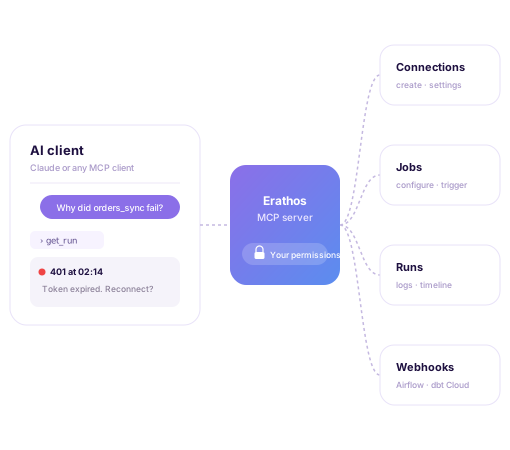
The Erathos MCP server lets an AI agent, like Claude, act on your workspace from a conversation: list connections and jobs, investigate a failed run, choose what to sync and trigger runs, without going through the UI for every step.
The agent only acts within the workspaces your account can already access, and every call is checked against your real permissions. Credentials stay in workspace secrets, never in the conversation.
Your connector, built by a coding agent
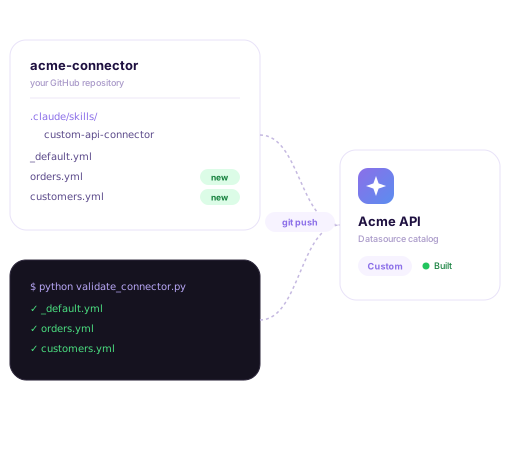
The custom connector template ships with a skill for coding agents. Open the repository in Claude Code, describe the API you want to connect, and the agent builds the connector for you, with no YAML written by hand.
It calls the real API to work out fields, primary key and pagination, flags what it could not verify, and runs the validation until the connector passes. Every push is a deploy, so it never pushes without asking.
Everything you do in the platform, from code too
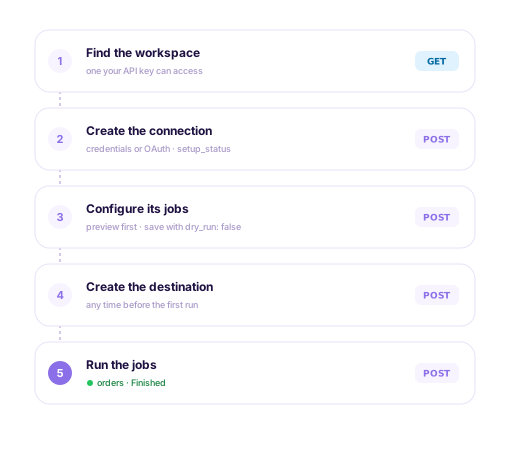
The developer API covers the whole setup: create connections, configure jobs, create destinations and run jobs. Provision ingestion from your own product, from scripts or from your CI pipeline.
Jobs get a preview before you save, and each connection reports which setup step it is on, so your code knows what to do next.
Whoever loves data, loves Erathos.
“Every new source implementation, if I had to do it myself, would take about two or three months. With Erathos, it's done in a few hours. I don't need the skills of a data engineer to generate real value from the company's data.”


“Erathos revolutionized data management at WE. By integrating multiple SaaS tools into a single DW, our technical team now focuses on the core business. We implemented dashboards with insights across every area, enriching our organizational culture and improving our decision-making.”

“We used to have a lot of rework, and now we don't. It's more efficient to work this way. If it's not your core business, hire Erathos. Spend your time modeling your own domain, not someone else's.”

“If I didn't have this infrastructure, I'd need three or four people to do what Erathos does today. I was able to generate real value from my data with a much leaner setup than I thought I'd need. That's the core of building a data-driven culture: the team only uses data when they can trust it.”

“Erathos brought a practical turnaround at CCM. We were able to integrate financial systems, CRM, and processes with BigQuery in just a few clicks, with no technical team required. That gave us a reliable data warehouse that powers automations, dashboards, and even our customer service bots.”


“The robustness and efficiency of Erathos's connectors — whether for Meta, Google, RD Station, or ERPs like Bling and Conta Azul — make the whole process much faster and more reliable. The technical documentation is extremely well put together and intuitive, which makes implementation much easier.”









Frequently Asked Questions
MCP (Model Context Protocol) is an open standard for connecting AI agents to other systems. The Erathos MCP server works with MCP-compatible clients such as Claude: you add the server to your client and authenticate with your Erathos account. The steps are in the MCP docs.
No. To create a connection, the agent hands you a link to enter the credentials in the platform itself, and they stay in workspace secrets, never in the conversation. If whoever holds the credentials has no Erathos account, the agent can create a single-use secure link for them.
No. It only acts within the workspaces your account can already access, and every call is checked against your permissions at the time of the request.
Custom connectors are on the Pro and Enterprise plans. The coding-agent skill ships with the connector template: Claude Code loads it automatically, and other agents can be pointed at the skill file. See the custom connector docs.
With an Erathos API key, sent in the Authorization header. The key acts as the user who owns it: each request can only do what that user can already do in the workspace.