Cloud computing data warehouse: how it works, what it costs, and how data gets in
Learn how a cloud data warehouse stores data, bills for queries and loads data via ELT, with real BigQuery, Snowflake and Redshift prices.
A cloud data warehouse is a database service you rent from a cloud provider to store data from many systems and run analysis on it. This guide explains how one stores data, how it bills for queries, and how data gets loaded. Google BigQuery is the running example, with Snowflake and Amazon Redshift for comparison, and all prices come from the vendors' own pricing pages.
What is a cloud data warehouse?
A cloud data warehouse is a fully managed service for storing and analyzing large amounts of structured and semi-structured data, running in a public cloud instead of on servers you own. Google BigQuery, Snowflake, and Amazon Redshift are the most common examples.
"Fully managed" means the provider runs the hardware, installs upgrades, keeps backups, and adds capacity when you need more. You load data, write SQL, and pay a bill. Google's own definition lists storage, processing, integration, cleansing, and loading as the jobs a cloud warehouse does inside a public cloud.
A warehouse is built for analysis, which is a different job from the database behind your app. An analytic query often reads only a few columns but millions of rows, for example summing one column across a whole year of orders. BigQuery stores each column separately so it can read that one column without touching the rest of the row.
How does a cloud data warehouse differ from an on-premises data warehouse?
With an on-premises warehouse you buy and run the servers yourself, so capacity is fixed until you buy more. With a cloud warehouse the provider owns the servers, storage and compute grow on demand, and you pay for what you use instead of for machines that run all day.
Google describes traditional warehouses as systems where companies buy their own hardware and software, which makes them expensive to scale. Storage on those systems is usually small compared to compute, so data gets transformed fast and then thrown away to free space. A cloud warehouse removes that pressure because storage and compute grow separately.
On-premises warehouse | Cloud warehouse | |
|---|---|---|
Who runs the hardware | Your team | The cloud provider |
Adding capacity | Buy and install servers | Change a setting or let it autoscale |
Billing | Up-front purchase plus maintenance | Per query, per second of compute, or per node-hour |
Storage and compute | Grow together on the same machines | Grow separately |
Upgrades and patches | Your team | Automatic |
Cloud can still cost more than owned servers for some workloads. A warehouse that runs heavy queries all day on the pay-per-query meter is one example. The rest of this article shows how the meters work so you can do that math for your own workload.
How do cloud data warehouses store and query data?
Cloud data warehouses store data in columnar files on a shared storage system and run queries on a separate pool of compute workers. This split between storage and compute is the defining trait of the current platforms, and it lets you store petabytes without paying for compute you are not using.
In BigQuery the compute engine is Dremel and the storage system is Colossus, connected by Google's Jupiter network. Dremel runs SQL queries on a large shared cluster, while Colossus holds the columnar files in a format called Capacitor. When you submit a query, the engine splits the work across many workers, each worker scans its share of the data, and the results are gathered in memory.
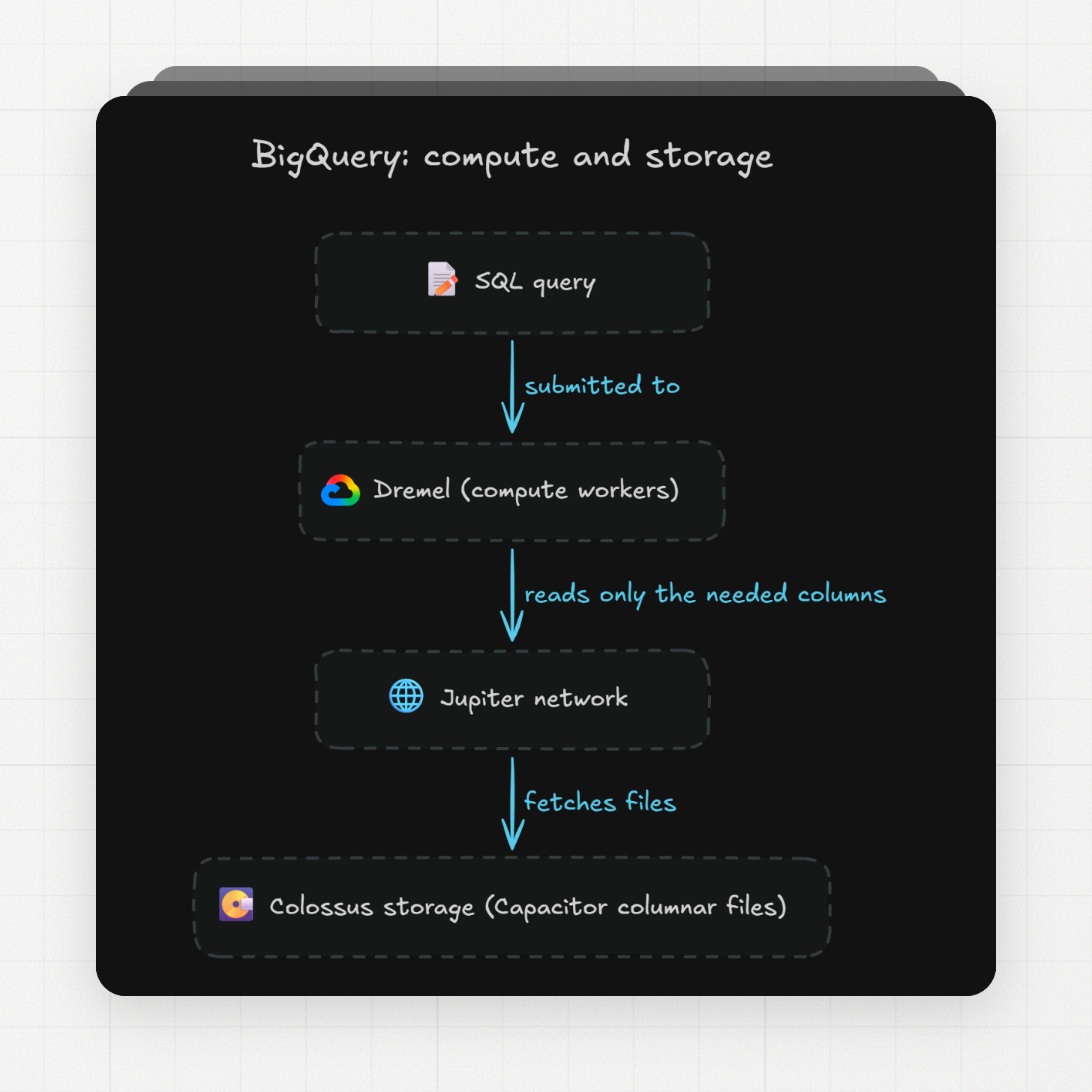
Columnar storage matters for two reasons. First, a query that needs three columns reads only those three columns from disk. Second, values inside one column repeat more than values across a row, so the files compress better with tricks like run-length encoding (storing "the value 5, repeated 400 times" instead of 400 copies of 5).
BigQuery offers two ways to bill for storage: logical (the uncompressed size, the default) and physical (the compressed size on disk). Switching between them changes only the meter, since the data is always stored compressed.
How do partitioning and clustering cut query cost?
Partitioning splits a table into segments by one column, usually a date, so a query with a date filter reads only the matching segments and skips the rest. Clustering sorts the data inside the table (or inside each partition) by up to four columns, so a filter on those columns skips whole storage blocks.
BigQuery calls the skipping "pruning". If a query has a qualifying filter on the partitioning column, BigQuery scans only the partitions that match. You can partition by a date, timestamp, or datetime column, by ranges of an integer column, or by the time BigQuery ingested each row. Daily is the default granularity, and hourly, monthly, and yearly are also available.
Clustering works at a finer level. A clustered table keeps its storage blocks sorted by the columns you pick. When a query filters on those columns, BigQuery reads the block metadata and skips blocks that cannot contain matching rows. Column order matters: a filter on the first clustering column gets the most benefit.
Partitioning | Clustering | |
|---|---|---|
Columns | One column only | Up to four columns |
Column types | Date, timestamp, datetime, integer range, ingestion time | Top-level, non-repeated columns: string, integer, numeric, date, timestamp, bool, geography, range |
Cost estimate before running | Exact | Only known after the query runs |
Works well when | Filters follow one time or ID range | Filters hit several columns or high-cardinality values |
Limits | 10,000 partitions per table; 4,000 partitions changed per job | Helps mainly when the table or partition is over 64 MB |
The numbers in the table come from Google's quota page and the clustering docs. Clustering also does not guarantee fewer slots (the compute units BigQuery bills for on capacity pricing), so on that meter the bill may not drop even when fewer bytes are read.
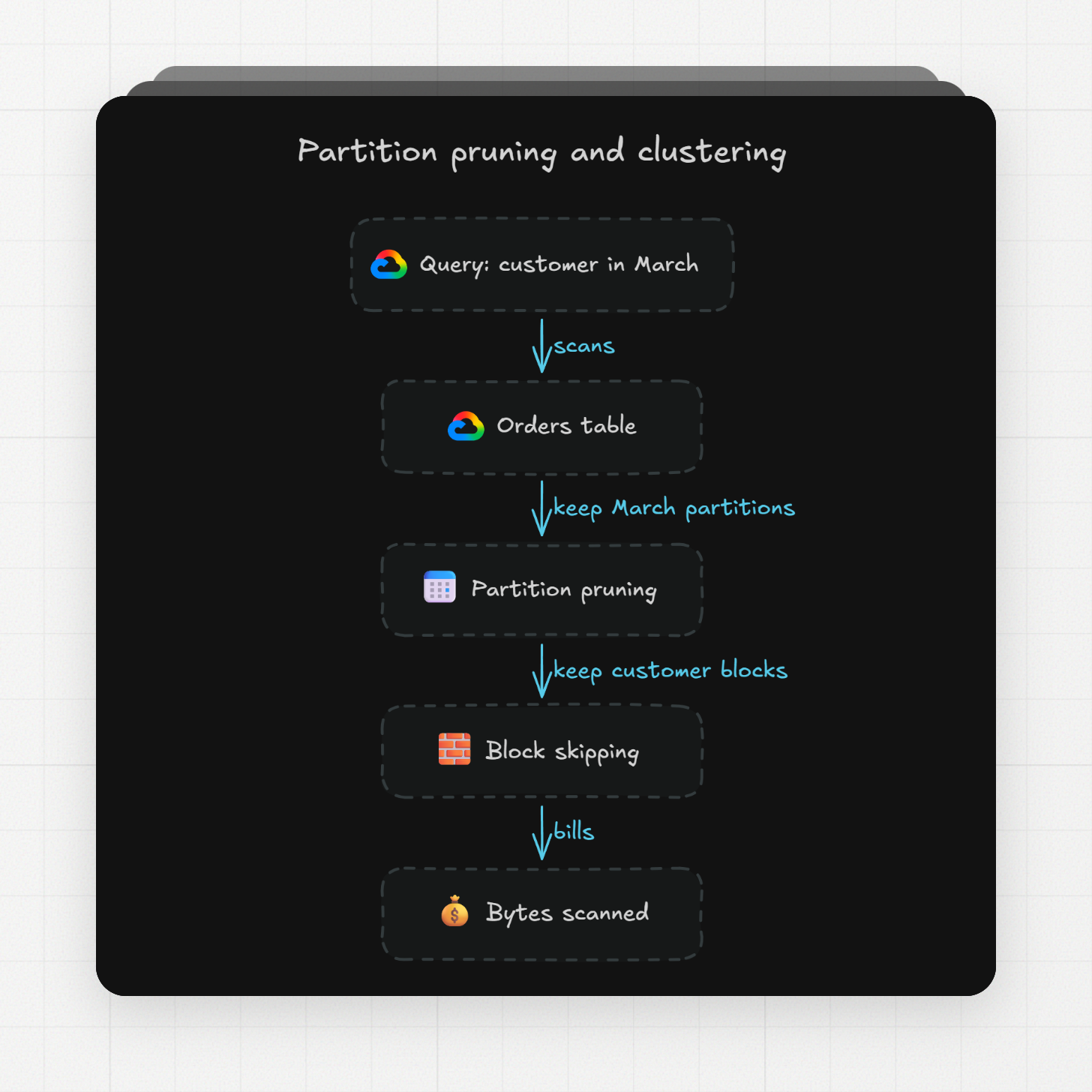
Both features combine. A common layout for an orders table is a daily partition on the order date plus clustering on customer ID. A query for one customer's orders in March first drops every partition outside March, then drops every block inside those partitions that does not cover that customer's ID range. Google recommends clustering instead of partitioning when partitions would end up smaller than about 10 GB, because thousands of tiny partitions slow down metadata reads.
Partitioning also lowers the storage bill. BigQuery judges each partition on its own for long-term storage pricing, so a partition nobody has touched for 90 days moves to the cheaper long-term rate even while new partitions keep arriving. Another setting for big tables is the require partition filter option, which makes BigQuery reject any query on that table that has no usable partition filter.
How do cloud data warehouse pricing models compare?
The three big cloud warehouses use different meters. BigQuery bills either bytes scanned per query or slot-hours of compute, Snowflake bills credits for each second a virtual warehouse runs, and Redshift bills node-hours for provisioned clusters or RPU-hours for Serverless.
Warehouse and model | What you pay for | Listed rate (region in source) | Minimums and free tier |
|---|
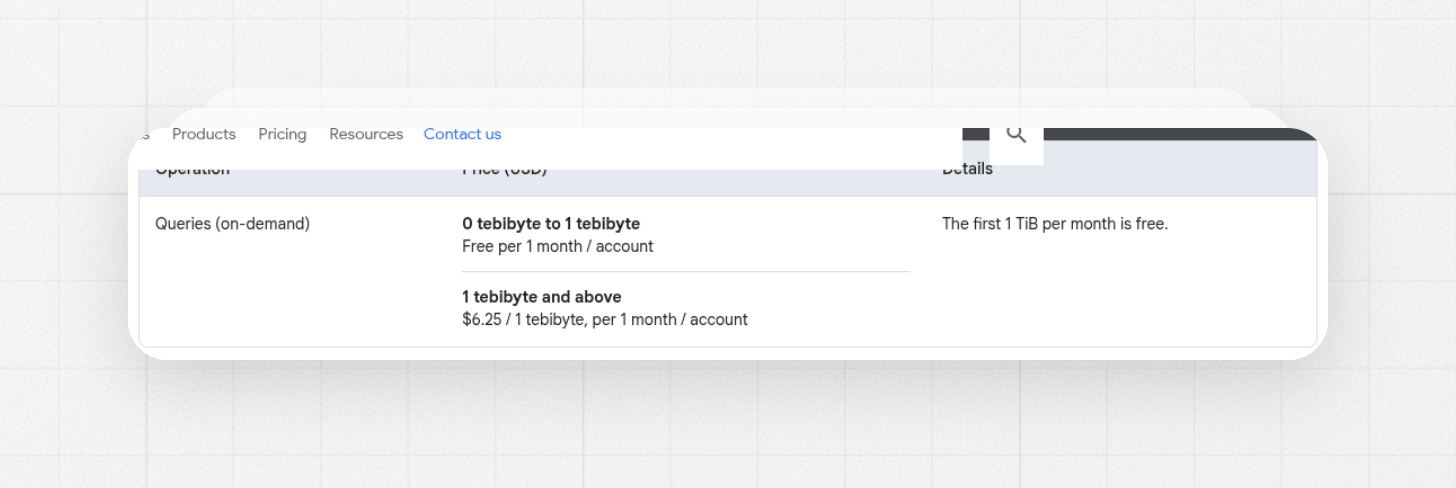
BigQuery on-demand query pricing: $6.25 per TiB, first 1 TiB per month free
BigQuery on-demand | Bytes your query reads | $6.25 per TiB (Iowa/US) | First 1 TiB per month free; at least 10 MB billed per table and per query |
|---|
Amazon Redshift Serverless pricing, billed per RPU-hour with a 60-second minimum
BigQuery capacity (editions) | Slot-hours | $0.04 (Standard), $0.06 (Enterprise), $0.10 (Enterprise Plus) per slot-hour | Per second, 1-minute minimum by default; commitments come in blocks of 50 slots |
|---|---|---|---|
Snowflake virtual warehouse | Credits per hour, by warehouse size | Per second, 60-second minimum; suspended warehouses use no credits | |
Redshift Serverless | RPU-hours while active | $0.375 per RPU-hour (US East, N. Virginia) | Per second, 60-second minimum; base capacity from 4 to 1024 RPUs |
Redshift Provisioned | Node-hours | Hourly billing, reserved instances for discounts |
A few details make the rows easier to compare. Google prices in TiB (tebibytes), not terabytes, so keep the same unit when you compare. A BigQuery slot is a virtual CPU. A Snowflake credit is a unit of compute time whose dollar price comes from your plan, and Snowflake's docs list warehouse sizes in credits per hour rather than dollars. A Redshift RPU (Redshift Processing Unit) comes with 16 GB of memory, and the $1.50 per hour starting price is 4 RPUs times $0.375.
Storage is billed separately on all three. On BigQuery the first 10 GiB per month is free, active logical storage costs $0.000031507 per GiB-hour in Iowa, and Google's own example puts 1 TiB stored for a full month at $23.552. Data that has not changed for 90 days moves to long-term storage, and the price drops by about 50% with no change in performance!
BigQuery on-demand has two rules that change how the bill adds up. Charges follow the columns you select, so adding a LIMIT to a query does not reduce the bytes billed. And on-demand projects generally get up to 2,000 concurrent slots, shared by all queries in the project, so a burst of heavy queries can queue.
When is BigQuery on-demand cheaper than capacity pricing?
On-demand is cheaper when your total scanned data is small or bursty, because the first TiB each month is free and you pay nothing while idle. Capacity pricing is cheaper when queries run most of the day and you want a fixed monthly number, because you pay for time, not for the amount of data read.
The math is simple once you have your own numbers. On-demand: a team that scans 20 TiB in a month pays for 19 TiB after the free tier, so 19 × $6.25 = $118.75. Capacity on the Standard edition: 100 slots running for 10 hours is 1,000 slot-hours, so 1,000 × $0.04 = $40. Which one wins depends on how many slot-hours your queries need, and you can only see that from your own job history.
The two models also fail in different ways. On-demand has no ceiling by default, so one query that reads a multi-year table with no partition filter bills for the whole table. Capacity has a ceiling but also a floor. Autoscaling bills per second with a one-minute minimum, and one-year or three-year commitments are dedicated slots you pay for over the whole term.
BigQuery lets you set a maximum bytes billed per query on on-demand, and the editions come in three tiers with different features, so the pick is rarely price alone. The Standard edition uses autoscaling only, while Enterprise and Enterprise Plus add a baseline of always-on slots.
How does data get loaded into a cloud data warehouse?
Data gets loaded through ELT (extract, load, transform): a pipeline copies raw rows out of each source system, loads them into the warehouse as they are, and the cleaning and joining happens inside the warehouse with SQL. This order is the reverse of classic ETL, which transforms data on a separate server before loading.
Google's comparison puts the difference in one line. In ELT the transformation happens inside the target warehouse, and the raw data stays available so you can reshape it later. In ETL a separate engine transforms first, so only the cleaned version reaches the warehouse. ELT fits cloud warehouses because they have the compute to do the transforming, and because storage is cheap enough to keep the raw copy.
ELT | ETL | |
|---|---|---|
Order | Extract, load, then transform | Extract, transform, then load |
Where transforms run | Inside the warehouse | On a separate staging server or tool |
What lands in the warehouse | Raw data | Cleaned data only |
|---|---|---|
Adding a new report later | Query the raw data again | Change the pipeline and reload |
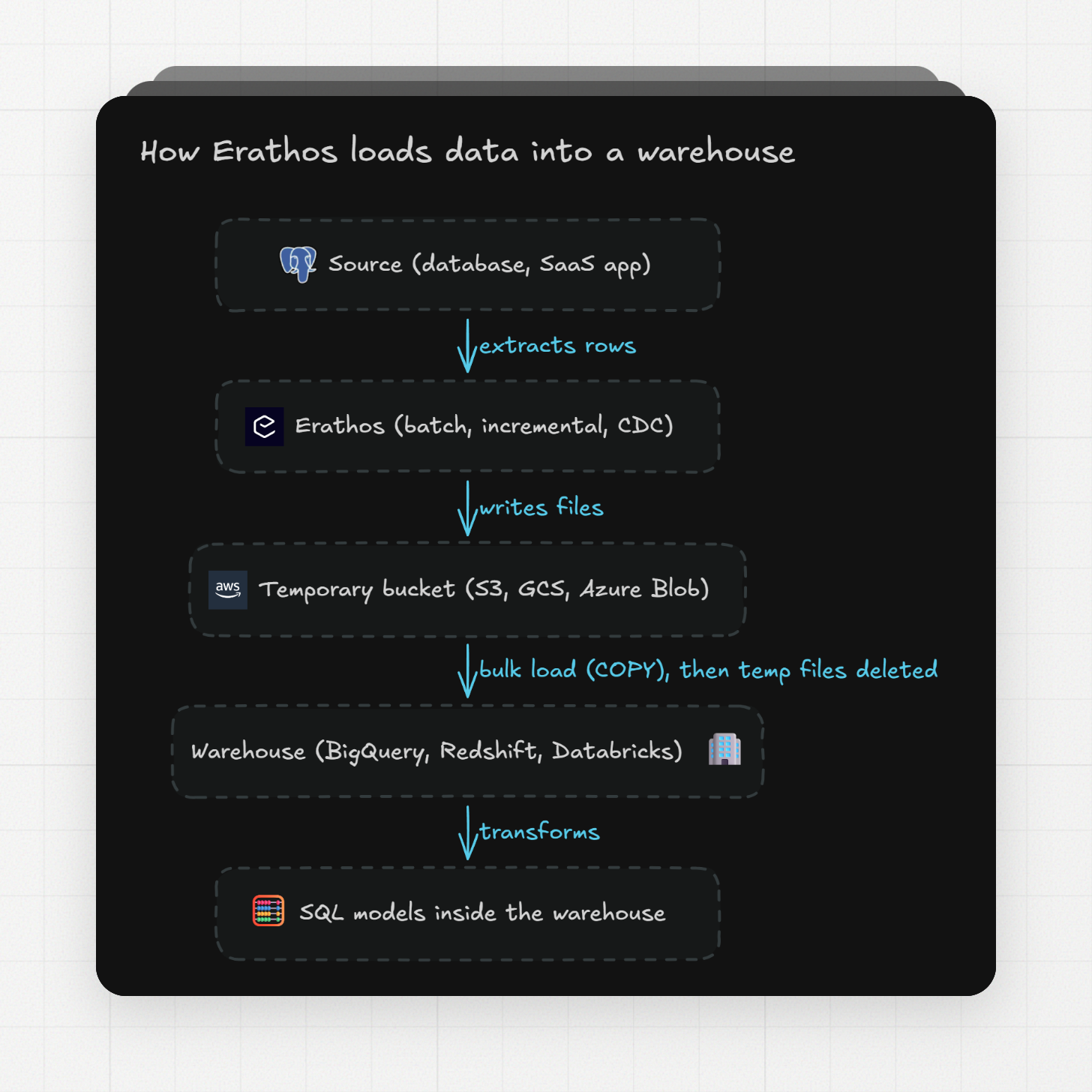
The extract-and-load half is what a tool like Erathos does. You pick a source from 100+ connectors, choose the tables and a schedule, and pick an update type: full batch, cursor-based incremental (only rows newer than a saved marker), or CDC (change data capture, which reads inserts, updates, and deletes from the source's change log). Pipelines into BigQuery run incrementally by default, so each run sends only new or changed rows.
The flow has four steps. Erathos extracts the data from the source, writes it to a temporary cloud bucket (S3, GCS, or Azure Blob Storage) in Erathos's own infrastructure, loads it into the warehouse with a bulk command like COPY or the destination's equivalent, and then deletes the temporary files. Nothing stays in the bucket after a run finishes.
On the BigQuery side, the connection needs a service account with four roles: BigQuery Data Editor, Job User, Metadata Viewer, and User. Erathos creates the tables and manages schema changes from there. Supported warehouse destinations today are BigQuery, Redshift, and Databricks, plus PostgreSQL, ClickHouse, and Amazon S3.
What should you check before choosing a cloud data warehouse?
I check four things in this order: which cloud already holds the data, which pricing meter matches the query pattern, how the team will load data into it, and what a week of real queries costs in a trial account. Our detailed comparison of Snowflake, BigQuery, and Redshift goes deeper on each.
Cloud fit comes first because moving data between clouds adds a step and a bill. If your files already are in S3, Redshift Serverless can query them in place as part of the same RPU-hour price.
The pricing meter should match how you query. Dashboards that refresh all day and many analysts running ad-hoc SQL fit a time-based meter (slots, credits, or RPUs) because one heavy query does not change the bill. A team that runs a few reports a day over small tables fits the pay-per-scan meter, and on BigQuery that team may stay inside the 1 TiB free tier.
For loading, I count the sources, check that the loading tool has a connector for each one, and decide whether daily batches are enough or whether some tables need CDC. Then I run the trial with real data and real queries for at least a week, and read the billing export before committing to a plan.
FAQ
Can you give me an example of a cloud-based data warehouse?
Google BigQuery, Snowflake, and Amazon Redshift are the three most common examples. BigQuery is serverless and bills either $6.25 per TiB scanned or slot-hours; Snowflake runs virtual warehouses billed in credits per second while they are on; Redshift runs as provisioned clusters billed per node-hour or as Serverless billed in RPU-hours.
What are the top 5 data warehouses?
The five platforms most often compared are Google BigQuery, Snowflake, Amazon Redshift, Databricks, and ClickHouse Cloud, which are the five profiled in the comparison that ranks for this question today. There is no neutral market-share list behind that number, so read "top 5" as "the five people compare most" rather than a ranking. The same source names the split between storage and compute as the trait all five share.
Is Databricks a data warehouse?
Databricks is a unified platform for data analytics and machine learning that people use as a warehouse, and it shows up in top-5 warehouse comparisons next to BigQuery, Snowflake, and Redshift. It covers more than SQL reporting, so if all you need is reports over structured tables, BigQuery or Redshift is the smaller tool. If your team also runs machine learning on the same data, Databricks covers both jobs in one place.
Is Microsoft Azure a data warehouse?
Azure is a cloud platform, and a data warehouse is one of the services you can run on it. The same is true of Google Cloud (BigQuery) and AWS (Redshift): the cloud provides the servers, and the warehouse service is the product you pick and pay for. Google's overview makes the same distinction between cloud providers and cloud warehouse services, noting that some run cluster-based and others serverless.
Is AWS a data warehouse?
AWS is a cloud provider. Its data warehouse service is Amazon Redshift, which comes in a provisioned option starting at $0.543 per hour and a Serverless option starting at $1.50 per hour. Erathos loads data into Redshift incrementally by default, the same way it does for BigQuery.
Try it with your own data
Loading real tables into a warehouse and running real queries for a week shows how it behaves. Erathos gives you Pro access for 14 days when you create an account, with 100+ connectors and BigQuery, Redshift, and Databricks as destinations. After the trial you move to the free plan (up to 1M rows a month) unless you pick a paid one.
Start your 14-day free trial of Erathos and load your first tables into BigQuery today.