Erathos + dbt Cloud: How to Orchestrate ELT Pipelines with Webhooks (Complete Guide)

Learn how to orchestrate ELT pipelines with Erathos and dbt using webhooks and APIs. Build event-driven pipelines, reduce BigQuery costs, and gain full data traceability.

Mar 18, 2026

Databricks HubSpot integration

In modern data projects, the separation of responsibilities between ingestion and transformation has become a fundamental practice. Erathos solves the problem of extracting and loading data (EL) from multiple sources into the data warehouse, while dbt specializes in transforming (T) that data into reliable analytical models.

However, this separation raises important questions: how can these processes be orchestrated efficiently? How can we ensure that dbt runs transformations only after new data has arrived? How can Erathos react to failures in critical dbt transformations?

The Erathos Orchestration API solves this problem by enabling the creation of event-driven pipelines. With webhooks, workflows are automatically triggered by real events such as completed ingestions, failures, or changes in data volume—reducing reliance on fixed schedules that don’t always reflect the current state.

The architecture we will implement in this tutorial represents a modern data engineering pattern:

  1. Erathos ingests transactional data from operational systems (PostgreSQL, MongoDB, APIs) into BigQuery

  2. Webhooks automatically trigger dbt Cloud jobs when new loads are completed

  3. dbt Cloud transforms raw data into analytical models (facts and dimensions)

  4. Reverse orchestration allows dbt to also control executions in Erathos when needed

The Problem: Decoupled Orchestration

Before implementing the solution, it’s important to understand the problems it addresses:

Scenario 1: Disconnected Fixed Schedules

Situation: Erathos is scheduled to run at 2 AM, and dbt at 3 AM. If Erathos ingestion fails or is delayed, dbt will process outdated data or fail due to missing data.

Solution: dbt runs only when Erathos ingestion completes successfully and at least one row has been transferred.

Scenario 2: Lack of Traceability

Situation: A dashboard shows incorrect data. There is no clear visibility into which stage of the pipeline failed or is outdated.

Solution: Each dbt run receives metadata from the Erathos execution (execution_id, number of rows, affected tables), enabling full traceability.

Scenario 3: Resource Waste

Situation: dbt runs periodically even when no new data is available, unnecessarily consuming BigQuery credits.

Solution: Webhooks trigger only when new data is available (ROWS > 0), optimizing resource usage.

Solution Architecture

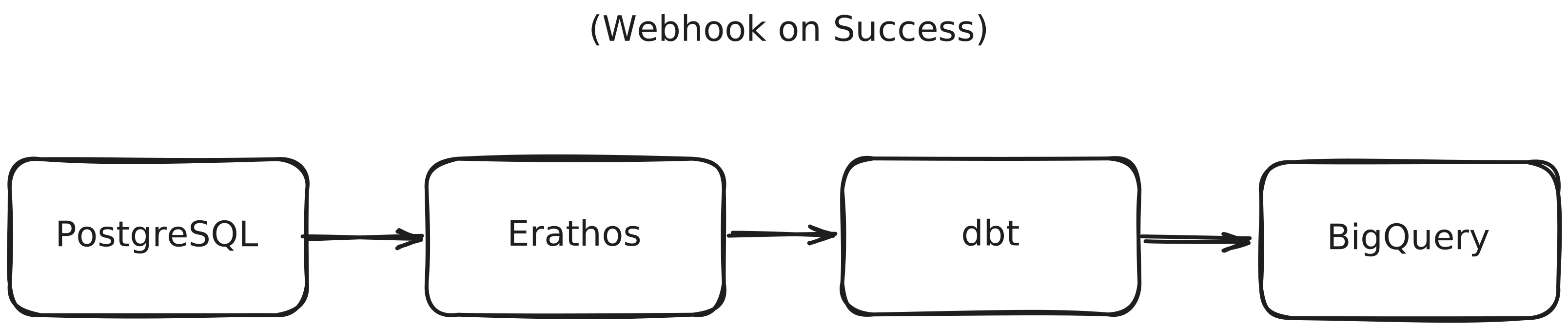
The implemented flow follows this structure:


image.png

Prior Knowledge

This tutorial assumes familiarity with:

  • Basic dbt concepts (models, sources, refs)

  • Navigating the dbt interface

  • REST APIs and webhooks

  • Basic data warehouse structure (facts and dimensions)

Prerequisites

Erathos Environment

  • Active workspace

  • Connected data source (PostgreSQL, MongoDB, API, etc.)

  • Configured and tested ingestion job

  • BigQuery configured as destination

dbt Cloud Environment

  • dbt project connected to BigQuery

  • Models already created and tested

  • Job configured in dbt Cloud

BigQuery

  • Active project in Google Cloud

  • Created datasets:

    • raw_data (raw data from Erathos)

    • staging (dbt intermediate layer)

    • analytics (final layer – facts and dimensions)

Step 0: Gathering Required Information

Before starting, you will need to collect some information. Use this table to organize it:


Information

Where to Find

Your Value

Erathos API Key

Settings > User > API Key

_______________

Erathos Workspace ID

Workspace URL: app.erathos.com/connections/{workspace_id}

_______________

dbt Account ID

dbt Cloud URL: cloud.getdbt.com/deploy/{account_id}/...

_______________

dbt Personal Token

Account Settings > API Access > Create Token

_______________

Erathos Job ID

Jobs > Select job > Copy ID from URL

_______________

dbt Job ID

Deploy > Jobs > Select job > ID in URL

_______________

Step 1: Configure Authentication Credentials

API integration requires authentication on both platforms. Credentials will be securely stored using Erathos Variables and Secrets.

Generate Erathos API Key

  1. Go to Settings > User in Erathos

  2. In the API Key section, click Create

  3. IMPORTANT: The key is shown only once. Copy and store it securely

  4. Optionally, set an expiration date

Example API Key:

erathos_abc123456

Generate dbt Cloud Personal Token

  1. Access your dbt Cloud account

  2. Navigate to Account Settings > API Access

  3. Click Create Service Token (or Personal Token)

  4. Copy the generated token

  5. Also copy the Account ID

Example configuration:

Account ID: 12345Personal Token: dbt_abc12345

Create Variables and Secrets in Erathos

Erathos allows you to centralize frequently used values (such as URLs and credentials) as key → value pairs.

  • Variables: for non-sensitive values

  • Secrets: for sensitive data that cannot be viewed after creation

Creating the dbt_account_id Variable

curl -X POST https://api.erathos.com/developers/workspaces/{workspace_id}/variables/ \  -H "Authorization: Api-Key {your_erathos_api_key}" \  -H "Content-Type: application/json" \  -d '{    "name": "dbt_account_id",    "value": "12345"  }'

Creating the dbt_personal_token Secret

curl -X POST https://api.erathos.com/developers/workspaces/{workspace_id}/secrets/ \  -H "Authorization: Api-Key {your_erathos_api_key}" \  -H "Content-Type: application/json" \  -d '{    "name": "dbt_personal_token",    "value": "dbt_a1b2c3d4e5f6..."  }'

Step 2: Identify Required IDs

Before creating webhooks, we need to collect the unique identifiers of the resources we will orchestrate.

Getting the Erathos Job ID

Each data connection in Erathos is represented by a Job. The job UUID is required for configuration.

Via Interface:

  1. Navigate to Jobs

  2. Locate the desired job (e.g., orders from PostgreSQL)

  3. Copy the Job ID

Via API:

curl -X GET "https://api.erathos.com/developers/workspaces/{workspace_id}/jobs/" \  -H "Authorization: Api-Key {your_erathos_api_key}"

Response (example):

{  "count": 3,  "results": [    {      "_id": "a1b2c3d4-e5f6-7890-abcd-ef1234567890",      "name": "orders",      "schema_name": "raw_data",      "connector_name": "PostgreSQL",      "is_active": true    },    {      "_id": "b2c3d4e5-f6a7-8901-bcde-f12345678901",      "name": "products",      "schema_name": "raw_data",      "connector_name": "PostgreSQL",      "is_active": true    }  ]}

Note the IDs:

  • Job orders: a1b2c3d4-e5f6-7890-abcd-ef1234567890

  • Job products: b2c3d4e5-f6a7-8901-bcde-f12345678901

Getting the dbt Cloud Job ID

In dbt Cloud, each run is configured as a Job.

Via Interface:

  1. Go to Deploy > Jobs

  2. Click the job (e.g., "Daily Analytics Refresh")

  3. Copy the ID from the URL

Via API:

curl -X GET "https://cloud.getdbt.com/api/v2/accounts/{account_id}/jobs/" \  -H "Authorization: Bearer {dbt_personal_token}"

Example Job ID: 54321

Step 3: Erathos Triggering dbt Cloud

After Erathos finishes ingesting data into BigQuery, it automatically triggers a dbt Cloud job.

Flow Overview

Erathos Job (orders) finishes successfully           Webhook triggers           POST to dbt Cloud API           dbt Job starts automatically           ↓Transformations run (staging  facts  dims)

Webhook Anatomy

A webhook in Erathos includes:

  1. description

  2. is_active

  3. jobs

  4. method

  5. url

  6. header

  7. body

  8. rules

Creating the Webhook: Erathos → dbt Cloud

curl -X POST "https://api.erathos.com/developers/workspaces/{workspace_id}/orchestration/webhooks/" \  -H "Authorization: Api-Key {your_erathos_api_key}" \  -H "Content-Type: application/json" \  -d '{    "description": "Trigger dbt Cloud job after successful orders ingestion",    "is_active": true,    "method": "POST",    "url": "https://cloud.getdbt.com/api/v2/accounts/${{variables.dbt_account_id}}/jobs/54321/run/",    "header": {      "Content-Type": "application/json",      "Accept": "application/json",      "Authorization": "Bearer ${{secrets.dbt_personal_token}}"    },    "body": {      "cause": "Triggered by Erathos after successful ingestion of ${{erathos.TABLE_NAME}} | Execution ID: ${{erathos.EXECUTION_ID}} | Rows: ${{erathos.ROWS}}"    },    "rules": [      {        "variable_name": "STATUS",        "operation": "EQUAL",        "value": "FINISHED"      },      {        "variable_name": "ROWS",        "operation": "GREATER_THAN",        "value": "0"      },      {        "variable_name": "NESTED_TABLE",        "operation": "EQUAL",        "value": "false"      }    ],    "jobs": [      "a1b2c3d4-e5f6-7890-abcd-ef1234567890"    ]  }'

Component Details

Dynamic URL

  • ${{variables.dbt_account_id}}: automatically injected

  • 54321: dbt job ID

  • /run/: execution endpoint

Authentication Headers

"Authorization": "Bearer ${{secrets.dbt_personal_token}}"

Metadata in Body

  • ${{erathos.TABLE_NAME}}

  • ${{erathos.EXECUTION_ID}}

  • ${{erathos.ROWS}}

Result in dbt Cloud:

Cause: Triggered by Erathos after successful ingestion of orders | Execution ID: abc-123-def | Rows: 1547

Rules: Smart Conditions

STATUS == "FINISHED" ANDROWS > 0 ANDNESTED_TABLE == false

Why these rules?

  1. Ensure successful ingestion

  2. Avoid empty runs

  3. Prevent duplicate triggers

Testing the Webhook

  1. Run the orders job in Erathos

  2. Confirm success and data transfer

  3. Check dbt Cloud → Run History

Step 4: Monitoring and Troubleshooting

List Webhooks

curl -X GET "https://api.erathos.com/developers/workspaces/{workspace_id}/orchestration/webhooks/"

Disable Webhook

curl -X PUT ".../webhooks/{webhook_id}/" \-d '{"is_active": false}'

Conclusion

You have successfully implemented an orchestration architecture between Erathos and dbt Cloud, creating truly event-driven and intelligent data pipelines.

  • Declarative Automation: Webhooks react to real events

  • Full Traceability: Metadata flows across the pipeline

  • Operational Efficiency: Runs only when needed

  • Architectural Flexibility: Works with Airflow, Prefect, and more

References

In modern data projects, the separation of responsibilities between ingestion and transformation has become a fundamental practice. Erathos solves the problem of extracting and loading data (EL) from multiple sources into the data warehouse, while dbt specializes in transforming (T) that data into reliable analytical models.

However, this separation raises important questions: how can these processes be orchestrated efficiently? How can we ensure that dbt runs transformations only after new data has arrived? How can Erathos react to failures in critical dbt transformations?

The Erathos Orchestration API solves this problem by enabling the creation of event-driven pipelines. With webhooks, workflows are automatically triggered by real events such as completed ingestions, failures, or changes in data volume—reducing reliance on fixed schedules that don’t always reflect the current state.

The architecture we will implement in this tutorial represents a modern data engineering pattern:

  1. Erathos ingests transactional data from operational systems (PostgreSQL, MongoDB, APIs) into BigQuery

  2. Webhooks automatically trigger dbt Cloud jobs when new loads are completed

  3. dbt Cloud transforms raw data into analytical models (facts and dimensions)

  4. Reverse orchestration allows dbt to also control executions in Erathos when needed

The Problem: Decoupled Orchestration

Before implementing the solution, it’s important to understand the problems it addresses:

Scenario 1: Disconnected Fixed Schedules

Situation: Erathos is scheduled to run at 2 AM, and dbt at 3 AM. If Erathos ingestion fails or is delayed, dbt will process outdated data or fail due to missing data.

Solution: dbt runs only when Erathos ingestion completes successfully and at least one row has been transferred.

Scenario 2: Lack of Traceability

Situation: A dashboard shows incorrect data. There is no clear visibility into which stage of the pipeline failed or is outdated.

Solution: Each dbt run receives metadata from the Erathos execution (execution_id, number of rows, affected tables), enabling full traceability.

Scenario 3: Resource Waste

Situation: dbt runs periodically even when no new data is available, unnecessarily consuming BigQuery credits.

Solution: Webhooks trigger only when new data is available (ROWS > 0), optimizing resource usage.

Solution Architecture

The implemented flow follows this structure:


image.png

Prior Knowledge

This tutorial assumes familiarity with:

  • Basic dbt concepts (models, sources, refs)

  • Navigating the dbt interface

  • REST APIs and webhooks

  • Basic data warehouse structure (facts and dimensions)

Prerequisites

Erathos Environment

  • Active workspace

  • Connected data source (PostgreSQL, MongoDB, API, etc.)

  • Configured and tested ingestion job

  • BigQuery configured as destination

dbt Cloud Environment

  • dbt project connected to BigQuery

  • Models already created and tested

  • Job configured in dbt Cloud

BigQuery

  • Active project in Google Cloud

  • Created datasets:

    • raw_data (raw data from Erathos)

    • staging (dbt intermediate layer)

    • analytics (final layer – facts and dimensions)

Step 0: Gathering Required Information

Before starting, you will need to collect some information. Use this table to organize it:


Information

Where to Find

Your Value

Erathos API Key

Settings > User > API Key

_______________

Erathos Workspace ID

Workspace URL: app.erathos.com/connections/{workspace_id}

_______________

dbt Account ID

dbt Cloud URL: cloud.getdbt.com/deploy/{account_id}/...

_______________

dbt Personal Token

Account Settings > API Access > Create Token

_______________

Erathos Job ID

Jobs > Select job > Copy ID from URL

_______________

dbt Job ID

Deploy > Jobs > Select job > ID in URL

_______________

Step 1: Configure Authentication Credentials

API integration requires authentication on both platforms. Credentials will be securely stored using Erathos Variables and Secrets.

Generate Erathos API Key

  1. Go to Settings > User in Erathos

  2. In the API Key section, click Create

  3. IMPORTANT: The key is shown only once. Copy and store it securely

  4. Optionally, set an expiration date

Example API Key:

erathos_abc123456

Generate dbt Cloud Personal Token

  1. Access your dbt Cloud account

  2. Navigate to Account Settings > API Access

  3. Click Create Service Token (or Personal Token)

  4. Copy the generated token

  5. Also copy the Account ID

Example configuration:

Account ID: 12345Personal Token: dbt_abc12345

Create Variables and Secrets in Erathos

Erathos allows you to centralize frequently used values (such as URLs and credentials) as key → value pairs.

  • Variables: for non-sensitive values

  • Secrets: for sensitive data that cannot be viewed after creation

Creating the dbt_account_id Variable

curl -X POST https://api.erathos.com/developers/workspaces/{workspace_id}/variables/ \  -H "Authorization: Api-Key {your_erathos_api_key}" \  -H "Content-Type: application/json" \  -d '{    "name": "dbt_account_id",    "value": "12345"  }'

Creating the dbt_personal_token Secret

curl -X POST https://api.erathos.com/developers/workspaces/{workspace_id}/secrets/ \  -H "Authorization: Api-Key {your_erathos_api_key}" \  -H "Content-Type: application/json" \  -d '{    "name": "dbt_personal_token",    "value": "dbt_a1b2c3d4e5f6..."  }'

Step 2: Identify Required IDs

Before creating webhooks, we need to collect the unique identifiers of the resources we will orchestrate.

Getting the Erathos Job ID

Each data connection in Erathos is represented by a Job. The job UUID is required for configuration.

Via Interface:

  1. Navigate to Jobs

  2. Locate the desired job (e.g., orders from PostgreSQL)

  3. Copy the Job ID

Via API:

curl -X GET "https://api.erathos.com/developers/workspaces/{workspace_id}/jobs/" \  -H "Authorization: Api-Key {your_erathos_api_key}"

Response (example):

{  "count": 3,  "results": [    {      "_id": "a1b2c3d4-e5f6-7890-abcd-ef1234567890",      "name": "orders",      "schema_name": "raw_data",      "connector_name": "PostgreSQL",      "is_active": true    },    {      "_id": "b2c3d4e5-f6a7-8901-bcde-f12345678901",      "name": "products",      "schema_name": "raw_data",      "connector_name": "PostgreSQL",      "is_active": true    }  ]}

Note the IDs:

  • Job orders: a1b2c3d4-e5f6-7890-abcd-ef1234567890

  • Job products: b2c3d4e5-f6a7-8901-bcde-f12345678901

Getting the dbt Cloud Job ID

In dbt Cloud, each run is configured as a Job.

Via Interface:

  1. Go to Deploy > Jobs

  2. Click the job (e.g., "Daily Analytics Refresh")

  3. Copy the ID from the URL

Via API:

curl -X GET "https://cloud.getdbt.com/api/v2/accounts/{account_id}/jobs/" \  -H "Authorization: Bearer {dbt_personal_token}"

Example Job ID: 54321

Step 3: Erathos Triggering dbt Cloud

After Erathos finishes ingesting data into BigQuery, it automatically triggers a dbt Cloud job.

Flow Overview

Erathos Job (orders) finishes successfully           Webhook triggers           POST to dbt Cloud API           dbt Job starts automatically           ↓Transformations run (staging  facts  dims)

Webhook Anatomy

A webhook in Erathos includes:

  1. description

  2. is_active

  3. jobs

  4. method

  5. url

  6. header

  7. body

  8. rules

Creating the Webhook: Erathos → dbt Cloud

curl -X POST "https://api.erathos.com/developers/workspaces/{workspace_id}/orchestration/webhooks/" \  -H "Authorization: Api-Key {your_erathos_api_key}" \  -H "Content-Type: application/json" \  -d '{    "description": "Trigger dbt Cloud job after successful orders ingestion",    "is_active": true,    "method": "POST",    "url": "https://cloud.getdbt.com/api/v2/accounts/${{variables.dbt_account_id}}/jobs/54321/run/",    "header": {      "Content-Type": "application/json",      "Accept": "application/json",      "Authorization": "Bearer ${{secrets.dbt_personal_token}}"    },    "body": {      "cause": "Triggered by Erathos after successful ingestion of ${{erathos.TABLE_NAME}} | Execution ID: ${{erathos.EXECUTION_ID}} | Rows: ${{erathos.ROWS}}"    },    "rules": [      {        "variable_name": "STATUS",        "operation": "EQUAL",        "value": "FINISHED"      },      {        "variable_name": "ROWS",        "operation": "GREATER_THAN",        "value": "0"      },      {        "variable_name": "NESTED_TABLE",        "operation": "EQUAL",        "value": "false"      }    ],    "jobs": [      "a1b2c3d4-e5f6-7890-abcd-ef1234567890"    ]  }'

Component Details

Dynamic URL

  • ${{variables.dbt_account_id}}: automatically injected

  • 54321: dbt job ID

  • /run/: execution endpoint

Authentication Headers

"Authorization": "Bearer ${{secrets.dbt_personal_token}}"

Metadata in Body

  • ${{erathos.TABLE_NAME}}

  • ${{erathos.EXECUTION_ID}}

  • ${{erathos.ROWS}}

Result in dbt Cloud:

Cause: Triggered by Erathos after successful ingestion of orders | Execution ID: abc-123-def | Rows: 1547

Rules: Smart Conditions

STATUS == "FINISHED" ANDROWS > 0 ANDNESTED_TABLE == false

Why these rules?

  1. Ensure successful ingestion

  2. Avoid empty runs

  3. Prevent duplicate triggers

Testing the Webhook

  1. Run the orders job in Erathos

  2. Confirm success and data transfer

  3. Check dbt Cloud → Run History

Step 4: Monitoring and Troubleshooting

List Webhooks

curl -X GET "https://api.erathos.com/developers/workspaces/{workspace_id}/orchestration/webhooks/"

Disable Webhook

curl -X PUT ".../webhooks/{webhook_id}/" \-d '{"is_active": false}'

Conclusion

You have successfully implemented an orchestration architecture between Erathos and dbt Cloud, creating truly event-driven and intelligent data pipelines.

  • Declarative Automation: Webhooks react to real events

  • Full Traceability: Metadata flows across the pipeline

  • Operational Efficiency: Runs only when needed

  • Architectural Flexibility: Works with Airflow, Prefect, and more

References

In modern data projects, the separation of responsibilities between ingestion and transformation has become a fundamental practice. Erathos solves the problem of extracting and loading data (EL) from multiple sources into the data warehouse, while dbt specializes in transforming (T) that data into reliable analytical models.

However, this separation raises important questions: how can these processes be orchestrated efficiently? How can we ensure that dbt runs transformations only after new data has arrived? How can Erathos react to failures in critical dbt transformations?

The Erathos Orchestration API solves this problem by enabling the creation of event-driven pipelines. With webhooks, workflows are automatically triggered by real events such as completed ingestions, failures, or changes in data volume—reducing reliance on fixed schedules that don’t always reflect the current state.

The architecture we will implement in this tutorial represents a modern data engineering pattern:

  1. Erathos ingests transactional data from operational systems (PostgreSQL, MongoDB, APIs) into BigQuery

  2. Webhooks automatically trigger dbt Cloud jobs when new loads are completed

  3. dbt Cloud transforms raw data into analytical models (facts and dimensions)

  4. Reverse orchestration allows dbt to also control executions in Erathos when needed

The Problem: Decoupled Orchestration

Before implementing the solution, it’s important to understand the problems it addresses:

Scenario 1: Disconnected Fixed Schedules

Situation: Erathos is scheduled to run at 2 AM, and dbt at 3 AM. If Erathos ingestion fails or is delayed, dbt will process outdated data or fail due to missing data.

Solution: dbt runs only when Erathos ingestion completes successfully and at least one row has been transferred.

Scenario 2: Lack of Traceability

Situation: A dashboard shows incorrect data. There is no clear visibility into which stage of the pipeline failed or is outdated.

Solution: Each dbt run receives metadata from the Erathos execution (execution_id, number of rows, affected tables), enabling full traceability.

Scenario 3: Resource Waste

Situation: dbt runs periodically even when no new data is available, unnecessarily consuming BigQuery credits.

Solution: Webhooks trigger only when new data is available (ROWS > 0), optimizing resource usage.

Solution Architecture

The implemented flow follows this structure:


image.png

Prior Knowledge

This tutorial assumes familiarity with:

  • Basic dbt concepts (models, sources, refs)

  • Navigating the dbt interface

  • REST APIs and webhooks

  • Basic data warehouse structure (facts and dimensions)

Prerequisites

Erathos Environment

  • Active workspace

  • Connected data source (PostgreSQL, MongoDB, API, etc.)

  • Configured and tested ingestion job

  • BigQuery configured as destination

dbt Cloud Environment

  • dbt project connected to BigQuery

  • Models already created and tested

  • Job configured in dbt Cloud

BigQuery

  • Active project in Google Cloud

  • Created datasets:

    • raw_data (raw data from Erathos)

    • staging (dbt intermediate layer)

    • analytics (final layer – facts and dimensions)

Step 0: Gathering Required Information

Before starting, you will need to collect some information. Use this table to organize it:


Information

Where to Find

Your Value

Erathos API Key

Settings > User > API Key

_______________

Erathos Workspace ID

Workspace URL: app.erathos.com/connections/{workspace_id}

_______________

dbt Account ID

dbt Cloud URL: cloud.getdbt.com/deploy/{account_id}/...

_______________

dbt Personal Token

Account Settings > API Access > Create Token

_______________

Erathos Job ID

Jobs > Select job > Copy ID from URL

_______________

dbt Job ID

Deploy > Jobs > Select job > ID in URL

_______________

Step 1: Configure Authentication Credentials

API integration requires authentication on both platforms. Credentials will be securely stored using Erathos Variables and Secrets.

Generate Erathos API Key

  1. Go to Settings > User in Erathos

  2. In the API Key section, click Create

  3. IMPORTANT: The key is shown only once. Copy and store it securely

  4. Optionally, set an expiration date

Example API Key:

erathos_abc123456

Generate dbt Cloud Personal Token

  1. Access your dbt Cloud account

  2. Navigate to Account Settings > API Access

  3. Click Create Service Token (or Personal Token)

  4. Copy the generated token

  5. Also copy the Account ID

Example configuration:

Account ID: 12345Personal Token: dbt_abc12345

Create Variables and Secrets in Erathos

Erathos allows you to centralize frequently used values (such as URLs and credentials) as key → value pairs.

  • Variables: for non-sensitive values

  • Secrets: for sensitive data that cannot be viewed after creation

Creating the dbt_account_id Variable

curl -X POST https://api.erathos.com/developers/workspaces/{workspace_id}/variables/ \  -H "Authorization: Api-Key {your_erathos_api_key}" \  -H "Content-Type: application/json" \  -d '{    "name": "dbt_account_id",    "value": "12345"  }'

Creating the dbt_personal_token Secret

curl -X POST https://api.erathos.com/developers/workspaces/{workspace_id}/secrets/ \  -H "Authorization: Api-Key {your_erathos_api_key}" \  -H "Content-Type: application/json" \  -d '{    "name": "dbt_personal_token",    "value": "dbt_a1b2c3d4e5f6..."  }'

Step 2: Identify Required IDs

Before creating webhooks, we need to collect the unique identifiers of the resources we will orchestrate.

Getting the Erathos Job ID

Each data connection in Erathos is represented by a Job. The job UUID is required for configuration.

Via Interface:

  1. Navigate to Jobs

  2. Locate the desired job (e.g., orders from PostgreSQL)

  3. Copy the Job ID

Via API:

curl -X GET "https://api.erathos.com/developers/workspaces/{workspace_id}/jobs/" \  -H "Authorization: Api-Key {your_erathos_api_key}"

Response (example):

{  "count": 3,  "results": [    {      "_id": "a1b2c3d4-e5f6-7890-abcd-ef1234567890",      "name": "orders",      "schema_name": "raw_data",      "connector_name": "PostgreSQL",      "is_active": true    },    {      "_id": "b2c3d4e5-f6a7-8901-bcde-f12345678901",      "name": "products",      "schema_name": "raw_data",      "connector_name": "PostgreSQL",      "is_active": true    }  ]}

Note the IDs:

  • Job orders: a1b2c3d4-e5f6-7890-abcd-ef1234567890

  • Job products: b2c3d4e5-f6a7-8901-bcde-f12345678901

Getting the dbt Cloud Job ID

In dbt Cloud, each run is configured as a Job.

Via Interface:

  1. Go to Deploy > Jobs

  2. Click the job (e.g., "Daily Analytics Refresh")

  3. Copy the ID from the URL

Via API:

curl -X GET "https://cloud.getdbt.com/api/v2/accounts/{account_id}/jobs/" \  -H "Authorization: Bearer {dbt_personal_token}"

Example Job ID: 54321

Step 3: Erathos Triggering dbt Cloud

After Erathos finishes ingesting data into BigQuery, it automatically triggers a dbt Cloud job.

Flow Overview

Erathos Job (orders) finishes successfully           Webhook triggers           POST to dbt Cloud API           dbt Job starts automatically           ↓Transformations run (staging  facts  dims)

Webhook Anatomy

A webhook in Erathos includes:

  1. description

  2. is_active

  3. jobs

  4. method

  5. url

  6. header

  7. body

  8. rules

Creating the Webhook: Erathos → dbt Cloud

curl -X POST "https://api.erathos.com/developers/workspaces/{workspace_id}/orchestration/webhooks/" \  -H "Authorization: Api-Key {your_erathos_api_key}" \  -H "Content-Type: application/json" \  -d '{    "description": "Trigger dbt Cloud job after successful orders ingestion",    "is_active": true,    "method": "POST",    "url": "https://cloud.getdbt.com/api/v2/accounts/${{variables.dbt_account_id}}/jobs/54321/run/",    "header": {      "Content-Type": "application/json",      "Accept": "application/json",      "Authorization": "Bearer ${{secrets.dbt_personal_token}}"    },    "body": {      "cause": "Triggered by Erathos after successful ingestion of ${{erathos.TABLE_NAME}} | Execution ID: ${{erathos.EXECUTION_ID}} | Rows: ${{erathos.ROWS}}"    },    "rules": [      {        "variable_name": "STATUS",        "operation": "EQUAL",        "value": "FINISHED"      },      {        "variable_name": "ROWS",        "operation": "GREATER_THAN",        "value": "0"      },      {        "variable_name": "NESTED_TABLE",        "operation": "EQUAL",        "value": "false"      }    ],    "jobs": [      "a1b2c3d4-e5f6-7890-abcd-ef1234567890"    ]  }'

Component Details

Dynamic URL

  • ${{variables.dbt_account_id}}: automatically injected

  • 54321: dbt job ID

  • /run/: execution endpoint

Authentication Headers

"Authorization": "Bearer ${{secrets.dbt_personal_token}}"

Metadata in Body

  • ${{erathos.TABLE_NAME}}

  • ${{erathos.EXECUTION_ID}}

  • ${{erathos.ROWS}}

Result in dbt Cloud:

Cause: Triggered by Erathos after successful ingestion of orders | Execution ID: abc-123-def | Rows: 1547

Rules: Smart Conditions

STATUS == "FINISHED" ANDROWS > 0 ANDNESTED_TABLE == false

Why these rules?

  1. Ensure successful ingestion

  2. Avoid empty runs

  3. Prevent duplicate triggers

Testing the Webhook

  1. Run the orders job in Erathos

  2. Confirm success and data transfer

  3. Check dbt Cloud → Run History

Step 4: Monitoring and Troubleshooting

List Webhooks

curl -X GET "https://api.erathos.com/developers/workspaces/{workspace_id}/orchestration/webhooks/"

Disable Webhook

curl -X PUT ".../webhooks/{webhook_id}/" \-d '{"is_active": false}'

Conclusion

You have successfully implemented an orchestration architecture between Erathos and dbt Cloud, creating truly event-driven and intelligent data pipelines.

  • Declarative Automation: Webhooks react to real events

  • Full Traceability: Metadata flows across the pipeline

  • Operational Efficiency: Runs only when needed

  • Architectural Flexibility: Works with Airflow, Prefect, and more

References

In modern data projects, the separation of responsibilities between ingestion and transformation has become a fundamental practice. Erathos solves the problem of extracting and loading data (EL) from multiple sources into the data warehouse, while dbt specializes in transforming (T) that data into reliable analytical models.

However, this separation raises important questions: how can these processes be orchestrated efficiently? How can we ensure that dbt runs transformations only after new data has arrived? How can Erathos react to failures in critical dbt transformations?

The Erathos Orchestration API solves this problem by enabling the creation of event-driven pipelines. With webhooks, workflows are automatically triggered by real events such as completed ingestions, failures, or changes in data volume—reducing reliance on fixed schedules that don’t always reflect the current state.

The architecture we will implement in this tutorial represents a modern data engineering pattern:

  1. Erathos ingests transactional data from operational systems (PostgreSQL, MongoDB, APIs) into BigQuery

  2. Webhooks automatically trigger dbt Cloud jobs when new loads are completed

  3. dbt Cloud transforms raw data into analytical models (facts and dimensions)

  4. Reverse orchestration allows dbt to also control executions in Erathos when needed

The Problem: Decoupled Orchestration

Before implementing the solution, it’s important to understand the problems it addresses:

Scenario 1: Disconnected Fixed Schedules

Situation: Erathos is scheduled to run at 2 AM, and dbt at 3 AM. If Erathos ingestion fails or is delayed, dbt will process outdated data or fail due to missing data.

Solution: dbt runs only when Erathos ingestion completes successfully and at least one row has been transferred.

Scenario 2: Lack of Traceability

Situation: A dashboard shows incorrect data. There is no clear visibility into which stage of the pipeline failed or is outdated.

Solution: Each dbt run receives metadata from the Erathos execution (execution_id, number of rows, affected tables), enabling full traceability.

Scenario 3: Resource Waste

Situation: dbt runs periodically even when no new data is available, unnecessarily consuming BigQuery credits.

Solution: Webhooks trigger only when new data is available (ROWS > 0), optimizing resource usage.

Solution Architecture

The implemented flow follows this structure:


image.png

Prior Knowledge

This tutorial assumes familiarity with:

  • Basic dbt concepts (models, sources, refs)

  • Navigating the dbt interface

  • REST APIs and webhooks

  • Basic data warehouse structure (facts and dimensions)

Prerequisites

Erathos Environment

  • Active workspace

  • Connected data source (PostgreSQL, MongoDB, API, etc.)

  • Configured and tested ingestion job

  • BigQuery configured as destination

dbt Cloud Environment

  • dbt project connected to BigQuery

  • Models already created and tested

  • Job configured in dbt Cloud

BigQuery

  • Active project in Google Cloud

  • Created datasets:

    • raw_data (raw data from Erathos)

    • staging (dbt intermediate layer)

    • analytics (final layer – facts and dimensions)

Step 0: Gathering Required Information

Before starting, you will need to collect some information. Use this table to organize it:


Information

Where to Find

Your Value

Erathos API Key

Settings > User > API Key

_______________

Erathos Workspace ID

Workspace URL: app.erathos.com/connections/{workspace_id}

_______________

dbt Account ID

dbt Cloud URL: cloud.getdbt.com/deploy/{account_id}/...

_______________

dbt Personal Token

Account Settings > API Access > Create Token

_______________

Erathos Job ID

Jobs > Select job > Copy ID from URL

_______________

dbt Job ID

Deploy > Jobs > Select job > ID in URL

_______________

Step 1: Configure Authentication Credentials

API integration requires authentication on both platforms. Credentials will be securely stored using Erathos Variables and Secrets.

Generate Erathos API Key

  1. Go to Settings > User in Erathos

  2. In the API Key section, click Create

  3. IMPORTANT: The key is shown only once. Copy and store it securely

  4. Optionally, set an expiration date

Example API Key:

erathos_abc123456

Generate dbt Cloud Personal Token

  1. Access your dbt Cloud account

  2. Navigate to Account Settings > API Access

  3. Click Create Service Token (or Personal Token)

  4. Copy the generated token

  5. Also copy the Account ID

Example configuration:

Account ID: 12345Personal Token: dbt_abc12345

Create Variables and Secrets in Erathos

Erathos allows you to centralize frequently used values (such as URLs and credentials) as key → value pairs.

  • Variables: for non-sensitive values

  • Secrets: for sensitive data that cannot be viewed after creation

Creating the dbt_account_id Variable

curl -X POST https://api.erathos.com/developers/workspaces/{workspace_id}/variables/ \  -H "Authorization: Api-Key {your_erathos_api_key}" \  -H "Content-Type: application/json" \  -d '{    "name": "dbt_account_id",    "value": "12345"  }'

Creating the dbt_personal_token Secret

curl -X POST https://api.erathos.com/developers/workspaces/{workspace_id}/secrets/ \  -H "Authorization: Api-Key {your_erathos_api_key}" \  -H "Content-Type: application/json" \  -d '{    "name": "dbt_personal_token",    "value": "dbt_a1b2c3d4e5f6..."  }'

Step 2: Identify Required IDs

Before creating webhooks, we need to collect the unique identifiers of the resources we will orchestrate.

Getting the Erathos Job ID

Each data connection in Erathos is represented by a Job. The job UUID is required for configuration.

Via Interface:

  1. Navigate to Jobs

  2. Locate the desired job (e.g., orders from PostgreSQL)

  3. Copy the Job ID

Via API:

curl -X GET "https://api.erathos.com/developers/workspaces/{workspace_id}/jobs/" \  -H "Authorization: Api-Key {your_erathos_api_key}"

Response (example):

{  "count": 3,  "results": [    {      "_id": "a1b2c3d4-e5f6-7890-abcd-ef1234567890",      "name": "orders",      "schema_name": "raw_data",      "connector_name": "PostgreSQL",      "is_active": true    },    {      "_id": "b2c3d4e5-f6a7-8901-bcde-f12345678901",      "name": "products",      "schema_name": "raw_data",      "connector_name": "PostgreSQL",      "is_active": true    }  ]}

Note the IDs:

  • Job orders: a1b2c3d4-e5f6-7890-abcd-ef1234567890

  • Job products: b2c3d4e5-f6a7-8901-bcde-f12345678901

Getting the dbt Cloud Job ID

In dbt Cloud, each run is configured as a Job.

Via Interface:

  1. Go to Deploy > Jobs

  2. Click the job (e.g., "Daily Analytics Refresh")

  3. Copy the ID from the URL

Via API:

curl -X GET "https://cloud.getdbt.com/api/v2/accounts/{account_id}/jobs/" \  -H "Authorization: Bearer {dbt_personal_token}"

Example Job ID: 54321

Step 3: Erathos Triggering dbt Cloud

After Erathos finishes ingesting data into BigQuery, it automatically triggers a dbt Cloud job.

Flow Overview

Erathos Job (orders) finishes successfully           Webhook triggers           POST to dbt Cloud API           dbt Job starts automatically           ↓Transformations run (staging  facts  dims)

Webhook Anatomy

A webhook in Erathos includes:

  1. description

  2. is_active

  3. jobs

  4. method

  5. url

  6. header

  7. body

  8. rules

Creating the Webhook: Erathos → dbt Cloud

curl -X POST "https://api.erathos.com/developers/workspaces/{workspace_id}/orchestration/webhooks/" \  -H "Authorization: Api-Key {your_erathos_api_key}" \  -H "Content-Type: application/json" \  -d '{    "description": "Trigger dbt Cloud job after successful orders ingestion",    "is_active": true,    "method": "POST",    "url": "https://cloud.getdbt.com/api/v2/accounts/${{variables.dbt_account_id}}/jobs/54321/run/",    "header": {      "Content-Type": "application/json",      "Accept": "application/json",      "Authorization": "Bearer ${{secrets.dbt_personal_token}}"    },    "body": {      "cause": "Triggered by Erathos after successful ingestion of ${{erathos.TABLE_NAME}} | Execution ID: ${{erathos.EXECUTION_ID}} | Rows: ${{erathos.ROWS}}"    },    "rules": [      {        "variable_name": "STATUS",        "operation": "EQUAL",        "value": "FINISHED"      },      {        "variable_name": "ROWS",        "operation": "GREATER_THAN",        "value": "0"      },      {        "variable_name": "NESTED_TABLE",        "operation": "EQUAL",        "value": "false"      }    ],    "jobs": [      "a1b2c3d4-e5f6-7890-abcd-ef1234567890"    ]  }'

Component Details

Dynamic URL

  • ${{variables.dbt_account_id}}: automatically injected

  • 54321: dbt job ID

  • /run/: execution endpoint

Authentication Headers

"Authorization": "Bearer ${{secrets.dbt_personal_token}}"

Metadata in Body

  • ${{erathos.TABLE_NAME}}

  • ${{erathos.EXECUTION_ID}}

  • ${{erathos.ROWS}}

Result in dbt Cloud:

Cause: Triggered by Erathos after successful ingestion of orders | Execution ID: abc-123-def | Rows: 1547

Rules: Smart Conditions

STATUS == "FINISHED" ANDROWS > 0 ANDNESTED_TABLE == false

Why these rules?

  1. Ensure successful ingestion

  2. Avoid empty runs

  3. Prevent duplicate triggers

Testing the Webhook

  1. Run the orders job in Erathos

  2. Confirm success and data transfer

  3. Check dbt Cloud → Run History

Step 4: Monitoring and Troubleshooting

List Webhooks

curl -X GET "https://api.erathos.com/developers/workspaces/{workspace_id}/orchestration/webhooks/"

Disable Webhook

curl -X PUT ".../webhooks/{webhook_id}/" \-d '{"is_active": false}'

Conclusion

You have successfully implemented an orchestration architecture between Erathos and dbt Cloud, creating truly event-driven and intelligent data pipelines.

  • Declarative Automation: Webhooks react to real events

  • Full Traceability: Metadata flows across the pipeline

  • Operational Efficiency: Runs only when needed

  • Architectural Flexibility: Works with Airflow, Prefect, and more

References

Ingest data into your data warehouse - reliably

Ingest data into your data warehouse - reliably