BigQuery Cost Optimization: Reduce Query & Storage Costs Efficiently
Partitioning, clustering, and materialized views help reduce costs in BigQuery. A practical guide with SQL and spend monitoring strategies.

A BigQuery bill has three separate meters: compute, storage, and ingestion. This guide takes the meters one at a time, with Google's current prices, the SQL to find out who is spending what, and the settings that limit the damage.
All prices are USD from the US (us-central1) view of the BigQuery pricing page. Other locations cost more or less, so check your own region before doing any math. Google bills in binary units (1 TiB = 1,024 GiB), and this article keeps those units.
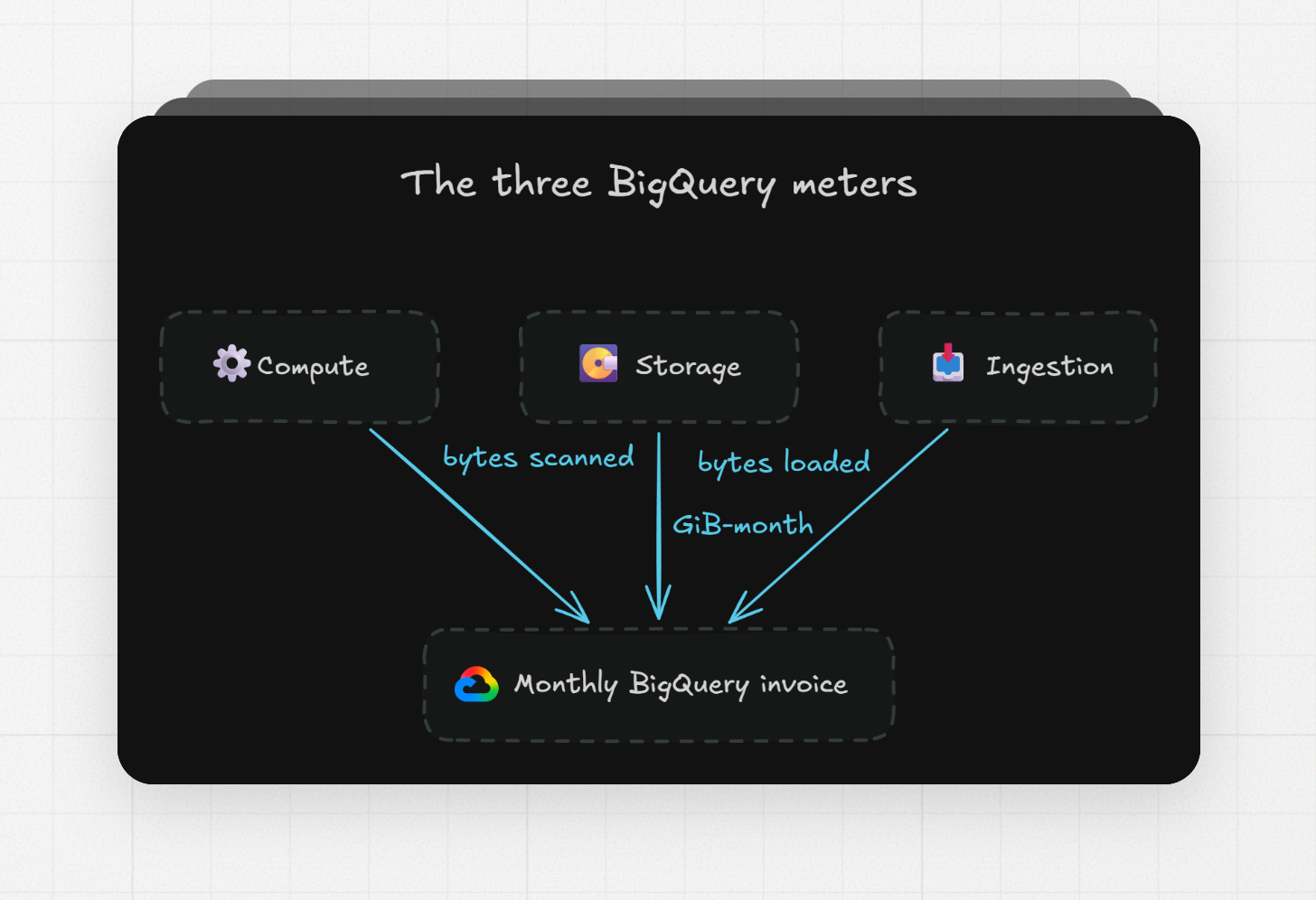
What does BigQuery cost, and which meter drives the bill?
BigQuery charges separately for compute, storage, and ingestion. On-demand compute costs $6.25 per TiB scanned after a free 1 TiB per month, capacity compute costs $0.04 to $0.10 per slot-hour depending on edition, and storage costs about $0.023 per GiB-month for active logical data.
Meter | What you pay for | Price (US) |
|---|---|---|
On-demand compute | Bytes your queries scan | $6.25 per TiB, first 1 TiB per month free |
Capacity compute (editions) | Slot-hours you reserve or autoscale | $0.04 (Standard), $0.06 (Enterprise), $0.10 (Enterprise Plus) per slot-hour |
Active logical storage | Uncompressed bytes, modified in last 90 days | $0.000031507 per GiB-hour, first 10 GiB free |
Long-term logical storage | Uncompressed bytes, untouched for 90 days | |
Batch loading | Load jobs from Cloud Storage or files | Free, uses a shared slot pool |
Storage Write API (gRPC) | Bytes written | $0.025 per GiB, first 2 TiB per month free |
Streaming inserts (Storage Write API REST) | Rows inserted | $0.01 per 200 MiB, 1 KB minimum per row |
The per-hour storage prices look tiny, so here is the monthly math at 730 hours per month (8,760 hours in a year divided by 12): active logical is 0.000031507 × 730 = $0.023 per GiB-month, and long-term logical is 0.000021918 × 730 = $0.016 per GiB-month.
The first question for any bill is which model the project uses. A project on on-demand pricing pays for bytes, so the fixes are about scanning less. A project on a reservation pays for slots, so scanning less only helps if it lets you shrink the reservation. The rest of this article says which fixes apply to which model.
How do I find the BigQuery queries and users that cost the most?
Query the INFORMATION_SCHEMA.JOBS view, which keeps 180 days of job history for the project, and sort by total_bytes_billed for on-demand projects or total_slot_ms for reservations. The view needs a region qualifier, and you exclude SCRIPT jobs so child jobs are not counted twice.
This lists the 20 biggest queries of the last 30 days in an on-demand project:
SELECT job_id, user_email, total_bytes_billed / POW(1024, 4) AS tib_billed, queryFROM `my_project`.`region-us`.INFORMATION_SCHEMA.JOBSWHERE creation_time >= TIMESTAMP_SUB(CURRENT_TIMESTAMP(), INTERVAL 30 DAY) AND job_type = 'QUERY' AND statement_type <> 'SCRIPT'ORDER BY total_bytes_billed DESCLIMIT 20;
Grouping by user_email shows who runs the expensive queries. If a service account for a BI tool or an orchestrator is at the top, the cost comes from a dashboard or a scheduled job instead of a person:
SELECT user_email, SUM(total_bytes_billed) / POW(1024, 4) AS tib_billed, SUM(total_bytes_billed) / POW(1024, 4) * 6.25 AS estimated_usdFROM `my_project`.`region-us`.INFORMATION_SCHEMA.JOBSWHERE creation_time >= TIMESTAMP_SUB(CURRENT_TIMESTAMP(), INTERVAL 30 DAY) AND job_type = 'QUERY' AND statement_type <> 'SCRIPT'GROUP BY user_emailORDER BY tib_billed DESC;
The 6.25 multiplier is the US on-demand rate and ignores the free first TiB, so treat the dollar column as an estimate. Google's own estimated-charge query on the same page uses the same approach and adds the detail that jobs are billed by end time in the PST8PDT time zone.
On a reservation, total_bytes_billed is informational only. Sort by total_slot_ms instead. The slot time tells you which jobs keep the autoscaler busy, and that is what you shrink to lower a capacity bill.
How can I prevent an expensive BigQuery query before it runs?
Three settings stop a bad query before it costs anything: a dry run to see the estimated bytes, a maximum bytes billed limit on the query, and a custom daily quota per project or per user. With on-demand pricing, custom quotas are the only way to put a hard limit on spend.
A dry run returns the estimated bytes and runs nothing. The console query validator does this on every keystroke, and the command line does it with a flag:
bq query --use_legacy_sql=false --dry_run \'SELECT user_id, amount FROM `my_project`.sales.orders WHERE order_date = "2026-09-15"'
Maximum bytes billed turns the estimate into a limit. If the estimate is over the limit, the query fails and nothing is charged. This example limits a query to 1 GiB (1,073,741,824 bytes):
bq query --maximum_bytes_billed=1073741824 --use_legacy_sql=false \'SELECT user_id, amount FROM `my_project`.sales.orders WHERE order_date = "2026-09-15"'
For clustered tables the estimate is an upper bound, so a query can fail the limit and still have cost less than the limit if it had run. Set the limit with some room on clustered tables.
Custom quotas limit the bytes a project, or each user in a project, can process per day. You set them on the Quotas page of the Google Cloud console by changing the BigQuery API "Query usage per day" and "Query usage per day per user" quotas from unlimited to a number. The per-user quota applies to all users and service accounts in the project, so you cannot give one analyst a bigger limit than another. Pair the quotas with a Cloud Billing budget so someone gets an email before the invoice does.
Which SQL changes reduce BigQuery bytes scanned?
Selecting only the columns you need is one of the biggest SQL changes you can make, because BigQuery stores data by column and bills only the columns a query reads. A LIMIT clause does not reduce the bill on a non-clustered table, since the engine still reads the full columns.
Google's own example on a public dataset cut bytes processed about eight-fold just by naming the needed columns instead of SELECT *. The ratio depends on how many columns the table has and how wide they are, so a dry run before and after is the way to know your own number.
A few billing rules change the math for small queries. Charges round up to the nearest MB, and there is a 10 MB minimum per table referenced and per query. A query that touches 50 small lookup tables is billed at least 500 MB even if the tables are a few KB each.
Query results are cached for about 24 hours, and a cache hit is free. The catch is that the cache only hits when the query text is byte-for-byte the same, including whitespace and comments, and none of the referenced tables have changed. A dashboard that adds a timestamp comment to each run gets zero cache hits.
When a large query feeds several downstream queries, write the shared stage to a destination table once and query the smaller table after. You pay storage for the destination table, but you stop re-scanning the source on each downstream run.
How do partitioning and clustering reduce BigQuery query costs?
Partitioning splits a table by a date, timestamp, or integer column so a filter on that column skips whole partitions, and pruned partitions are not counted in bytes scanned. Clustering sorts data inside a table or partition by up to four columns so filters on those columns read only the matching blocks.
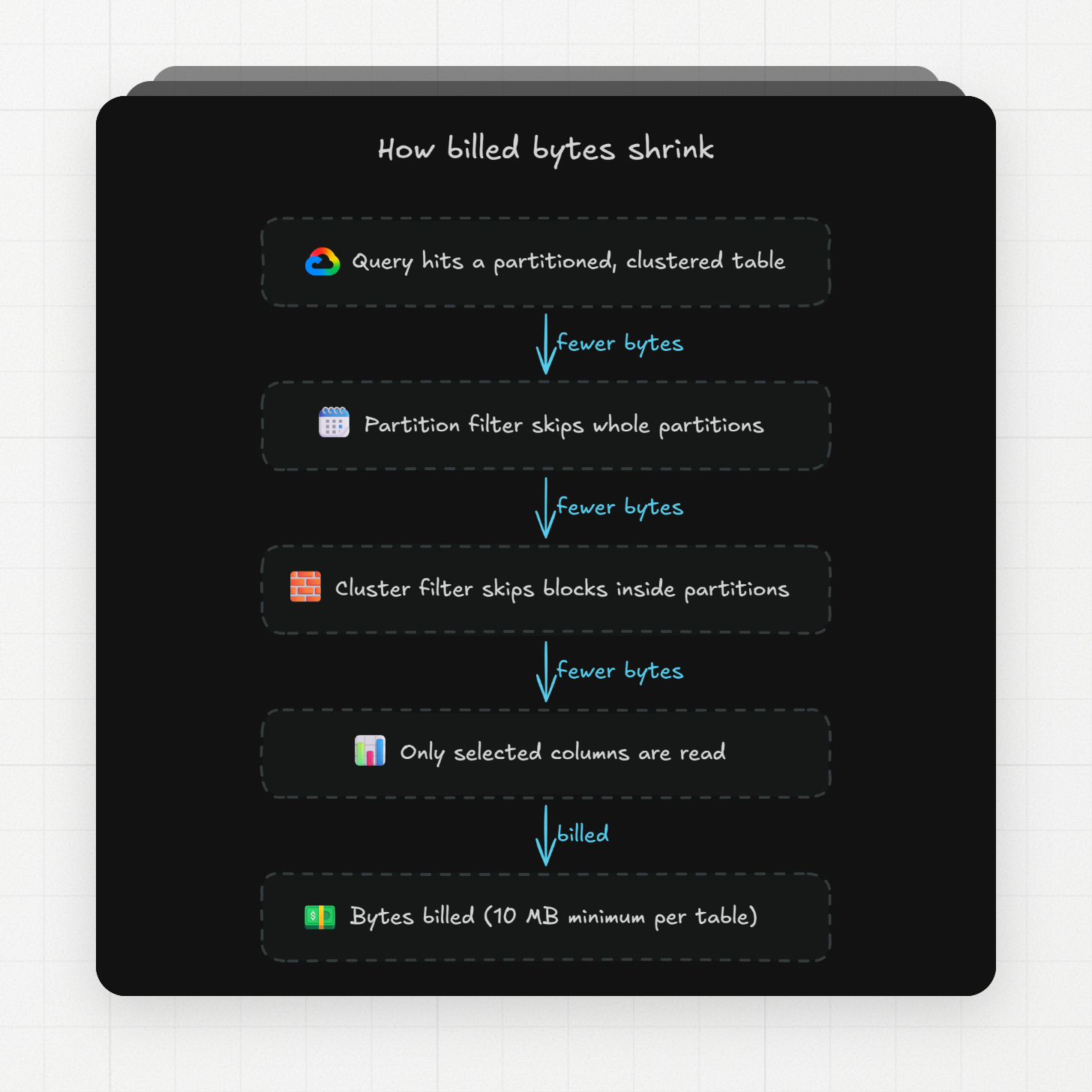
Partition pruning only works when the filter on the partition column is a constant expression that BigQuery can evaluate without reading the table. A literal date range qualifies. A subquery or a function of another column does not.
SELECT user_id, amountFROM `my_project`.sales.ordersWHERE order_date BETWEEN '2026-09-01' AND '2026-09-15';
The require partition filter option makes BigQuery reject any query on the table without a usable partition filter. The error is "Cannot query over table ... without a filter that can be used for partition elimination". This is the setting that stops a new analyst's SELECT * on a multi-year event table:
ALTER TABLE `my_project`.sales.orders SET OPTIONS (require_partition_filter = true);
Clustering works on top of partitioning or on its own. Google's guidance is that tables or partitions larger than 64 MB are likely to benefit, and the column order matters, so the first clustering column should be the one that appears in the most filters. Pick partition and cluster columns from the WHERE clauses in your JOBS output, not from a guess about what people might filter on.
One tradeoff with clustering is that the cost estimate before a query runs is an upper bound, because BigQuery only counts the skipped blocks while the query runs. The bill after the query is exact and often much lower than the estimate.
When do materialized views and BI Engine lower BigQuery query cost?
Materialized views pay off for frequently run, predictable queries, because BigQuery precomputes them in the background and rewrites matching queries to read the smaller view. They cost money in three places: querying the view, maintaining it when base tables change, and storing it. A non-incremental materialized view runs the full query on each refresh, so a view over a table that changes constantly can cost more than the queries it replaces.
BI Engine is an in-memory reservation priced at $0.0416 per GiB-hour. When it accelerates a query, the stage that reads table data is free. The fit is a dashboard that hits the same few tables hundreds of times a day. For a nightly batch job the reservation costs more than the scans it saves.
How can I reduce BigQuery storage costs without losing data I need?
Storage cost drops by about half automatically when a table or partition goes 90 consecutive days without modification, and partition expiration deletes old data on a schedule so you stop paying for it at all. Querying a table does not reset the 90-day clock. Any write, including a load or a DML update, does.
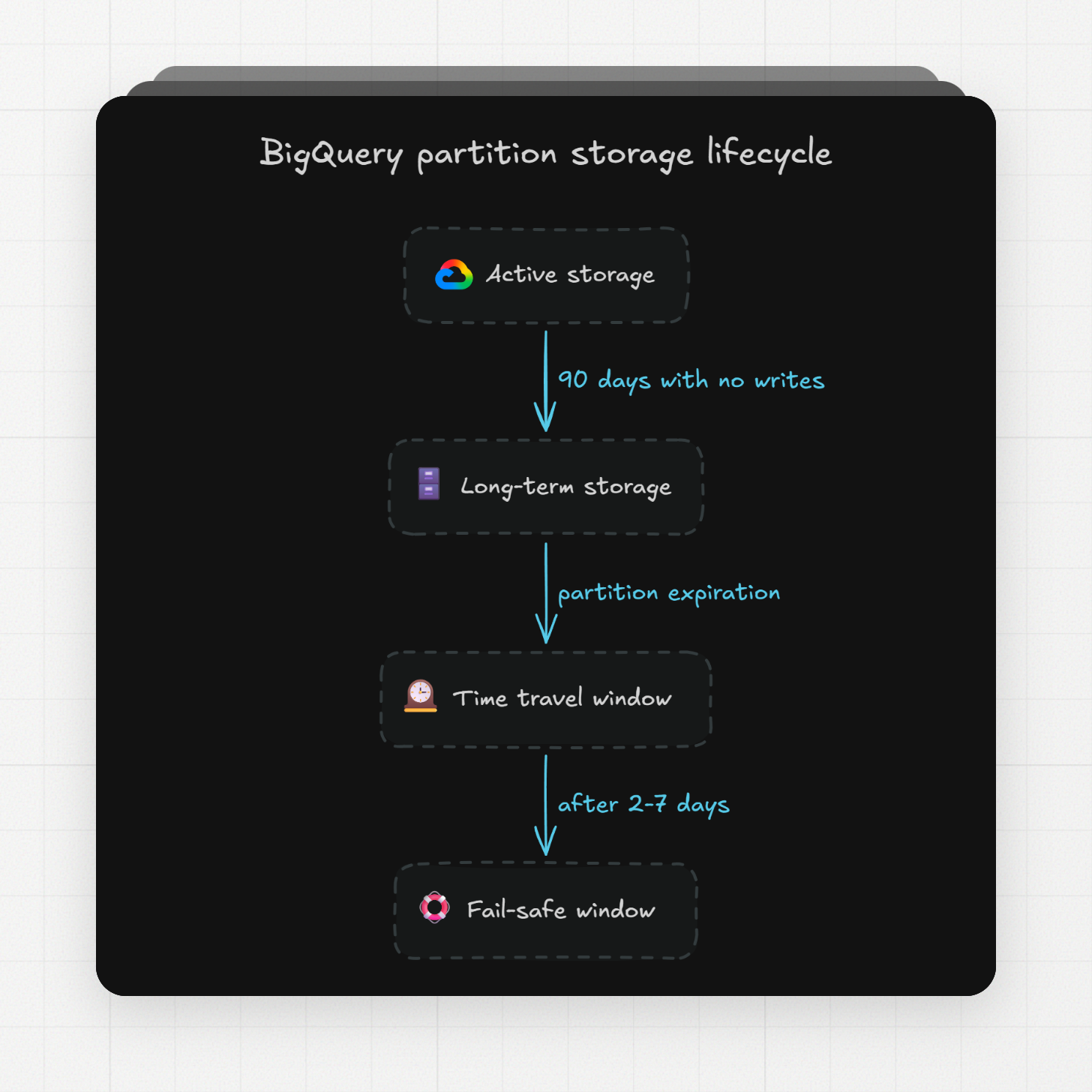
The 90-day rule applies per partition, so a date-partitioned table with ten years of history has most of its partitions in long-term storage already, as long as your pipeline only writes recent partitions. A pipeline that rewrites the whole table on each run keeps the whole table at the active rate forever. This is one reason incremental loading is cheaper than full refreshes.
Partition expiration is the biggest storage saver for event and log tables. Set it per table, or set a dataset default that applies to new partitioned tables:
ALTER TABLE `my_project`.events.page_views SET OPTIONS (partition_expiration_days = 400);
ALTER SCHEMA `my_project`.events SET OPTIONS (default_partition_expiration_days = 400);
A dataset default set after the dataset exists applies only to new tables, so existing tables need the table-level statement. A table-level expiration applies to all partitions in the table at once, and partitions already older than the new setting expire immediately. Check the oldest partition before you run it.
For row-level data that only matters for a few months, Google's storage guide suggests keeping aggregates long term and expiring the detail. A daily rollup table of a few MB replaces GiBs of raw events once the reporting window has passed.
Should I switch from logical to physical BigQuery storage billing?
Physical billing charges for compressed bytes at a higher rate, so it only saves money when your data compresses better than about 1.74 to 1 after time travel and fail-safe bytes are added. Logical billing, the default, charges for uncompressed bytes and includes time travel and fail-safe storage for free.
The 1.74 number comes from the price table: active physical is $0.000054795 per GiB-hour and active logical is $0.000031507, and 0.000054795 / 0.000031507 = 1.74. For long-term data the ratio is 0.000027397 / 0.000021918 = 1.25. Columnar data with repeated values often compresses well past these ratios, but wide tables of unique strings or already-compressed blobs may not.
Under physical billing, time travel and fail-safe bytes are charged separately at the active physical rate. Time travel keeps changed or deleted data for seven days by default, and fail-safe keeps it for another seven days after that. A table you overwrite daily keeps up to two weeks of old versions in those windows, and you pay for all of them. Before switching, check the TIME_TRAVEL_PHYSICAL_BYTES and FAIL_SAFE_PHYSICAL_BYTES columns in the TABLE_STORAGE view and add them to your compressed size.
You can shrink the time travel window to a minimum of two days. The fail-safe period is fixed at seven days and cannot be changed. Shorter time travel means less recoverable history, so this is a tradeoff between storage cost and how far back you can undo a mistake:
ALTER SCHEMA `my_project`.events SET OPTIONS (max_time_travel_hours = 48);
The billing model is set per dataset. A change takes 24 hours to take effect, and after a change you wait 14 days before changing it again, so a wrong guess costs two weeks. Compare the two models with the TABLE_STORAGE view first, then switch one dataset at a time:
ALTER SCHEMA `my_project`.events SET OPTIONS (storage_billing_model = 'PHYSICAL');
When should I use batch loads, the Storage Write API, or streaming inserts?
Batch loading is free and is the default choice unless the data has to be queryable within seconds of arriving. The Storage Write API over gRPC costs $0.025 per GiB after a free 2 TiB per month, and the REST streaming path costs $0.01 per 200 MiB with a 1 KB minimum per row.
Ingestion method | Price (US) | Tradeoff |
|---|---|---|
Batch load job | Uses a shared slot pool with no capacity or throughput guarantee; data lands when the job finishes | |
Storage Write API (gRPC) | $0.025 per GiB, first 2 TiB per month free | Rows available in seconds; cost scales with bytes written |
Streaming inserts (REST) | $0.01 per 200 MiB, 1 KB minimum per row | Small rows are billed as 1 KB each, so many tiny rows cost more than their size suggests |
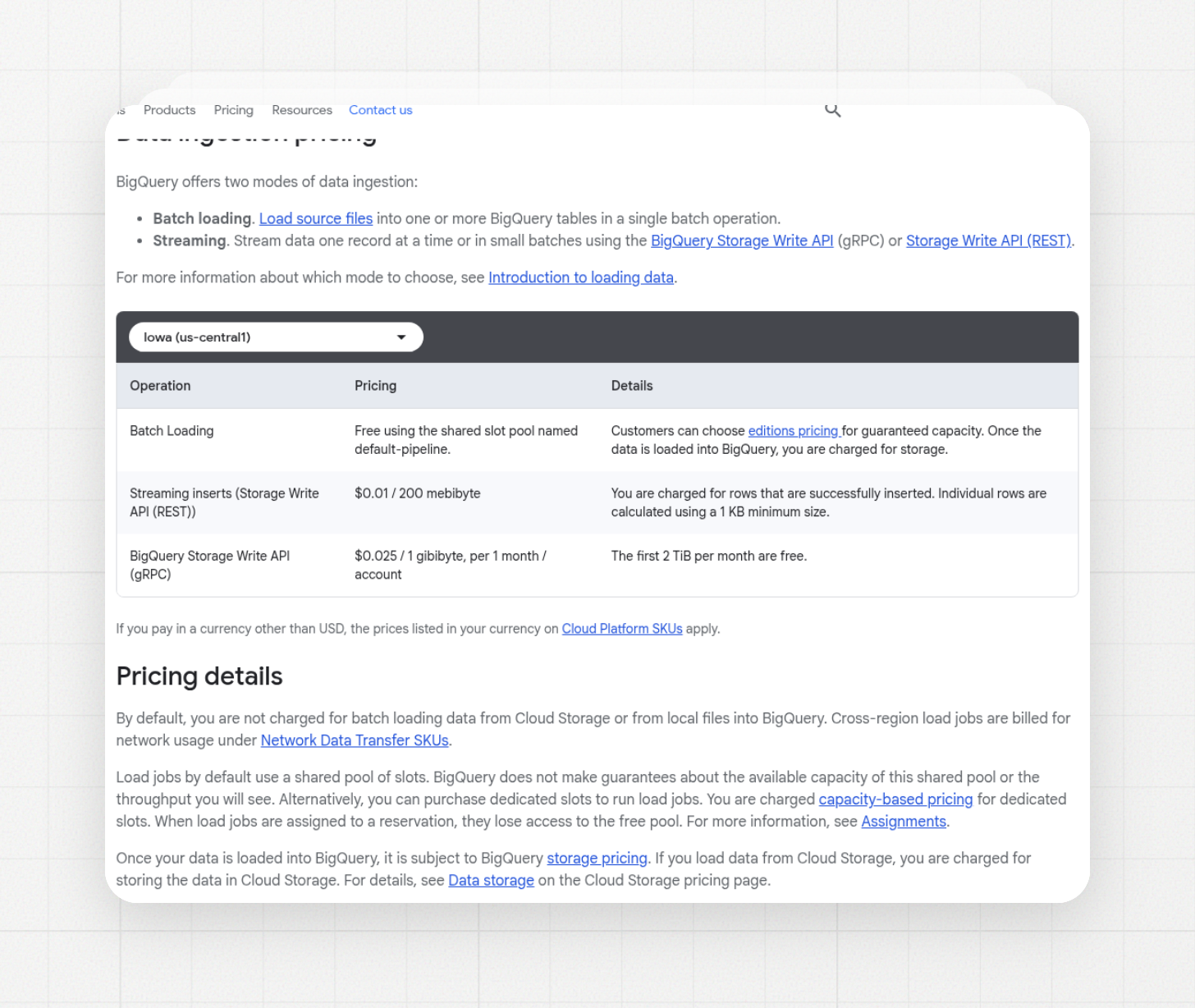
BigQuery data ingestion pricing (US), from Google's pricing page
The 1 KB minimum matters for event streams. A stream of 200-byte events is billed at five times its real size on the REST path. On gRPC the same stream is billed by real bytes.
Google's own advice from 2019 still holds: if the data does not need to be available immediately, switch to batch loading, because it is free. Hourly or even five-minute batches cover most reporting needs.
This is where the ELT tool matters. Erathos stages extracted data in a cloud bucket, then loads it into the warehouse and deletes the temporary files. Its BigQuery pipelines run incrementally by default, sending only new or changed rows on each run, with a choice of batch, cursor-based incremental, or CDC (change data capture, which reads the source database's change log instead of re-querying tables) as the update type.
Incremental loads help both compute and storage meters. Fewer bytes written means less ingestion cost, and writing only to recent partitions leaves older partitions untouched so they reach the long-term rate. For a source like MySQL, the CDC to BigQuery guide covers how change events map to row operations in the destination table. The BigQuery destination needs a service account with the Data Editor, Job User, Metadata Viewer, and User roles, which is enough to load without granting project-wide admin.
Should I use on-demand BigQuery pricing or capacity reservations?
On-demand is cheaper for bursty, unpredictable workloads, and a reservation is cheaper for steady, heavy workloads, but Google publishes no break-even number because the answer depends on your scan volume and how many slots your queries need. The way to decide is to price your last 30 days of JOBS data under both models.
The editions price per slot-hour, with discounts for one- and three-year commitments:
A worked comparison shows the scale. A 100-slot Standard reservation running all month costs 100 × $0.04 × 730 = $2,920. At $6.25 per TiB, that buys 2,920 / 6.25 = 467 TiB of on-demand scanning. If your project bills fewer than 467 TiB per month and 100 slots would cover it, on-demand is cheaper. If it bills more, or if you need predictable spend, the reservation wins. Your own numbers come from summing total_bytes_billed and looking at peak total_slot_ms in JOBS.
The autoscaler details change the math for small workloads. Slots scale in increments of 50, you are charged for scaled slots, not used slots, and scaled capacity is held for at least 60 seconds by default. A short query still pays for a full minute of 50 slots. Fluid scaling, an opt-in per reservation, removes the one-minute minimum and bills per second.
A baseline is the number of slots always allocated and always charged, even when nothing is running. For a workload with idle hours, a small baseline plus autoscaling costs less than a baseline sized for the peak. The max slots setting on the reservation is the spend limit, because the autoscaler will otherwise grow to it.
On-demand projects get up to 2,000 concurrent slots, shared across all queries in the project. That is a lot of compute for $6.25 per TiB, which is why on-demand stays cheaper until scan volume gets large.
What BigQuery cost controls should every team set this week?
Nine settings cover most of the savings in this article, and none of them need a migration:
- Run the JOBS queries above and find the top 20 queries and the top users by bytes billed.
- Set custom quotas for query bytes per day, per project and per user.
- Set maximum bytes billed on scheduled queries and BI tool connections.
- Turn on require partition filter for large partitioned tables.
- Set partition expiration on event and log tables.
- Compare logical and physical bytes in TABLE_STORAGE before touching the billing model.
- Move ingestion that does not need second-level latency to batch loads or incremental syncs.
- Set a max slots limit and a small baseline on reservations with idle hours.
- Create a Cloud Billing budget with an alert below the number that would get you in trouble.
Frequently Asked Questions (FAQ)
How much does BigQuery cost per TB?
On-demand queries cost $6.25 per TiB of data read, and the first 1 TiB per month is free. A TiB is 1,024 GiB, a bit more than a TB. Storage in Iowa works out to about $0.023 per GiB per month for active logical data and about $0.016 for long-term.
Does LIMIT reduce BigQuery cost?
Not on a regular table. BigQuery bills the columns it reads even with a LIMIT. On a clustered table LIMIT can reduce cost, because BigQuery stops after reading enough blocks. To look at sample rows for free, use the Preview tab or bq head.
How do I find expensive BigQuery queries?
Query the INFORMATION_SCHEMA.JOBS view and sort by total_bytes_billed. It includes the query text and the user email, so you can find both the query and the owner. The example query in the section above returns the top three for today.
When should I use partitioning versus clustering?
Partition on the one date or integer column most queries filter by, up to 10,000 partitions per table. Cluster on up to four other filter columns, with the most used one first. On large tables, use both: partition by date, cluster by the ID you filter on.
Are cached BigQuery query results free?
Yes. A query served from the cache costs nothing, and results stay cached for about 24 hours. The cache misses when the table changed, the query uses a function like CURRENT_TIMESTAMP, or the query text differs by even a space.
Does querying a table reset the long-term storage timer?
No. Reading a table, creating a view on it, or exporting it does not reset the 90-day timer. Loading, streaming, DML, and CREATE OR REPLACE TABLE do reset it, and only for the partitions they touch.
Should I choose on-demand or editions pricing?
On-demand costs less until your monthly scan volume passes the break-even point covered above. Below that point, byte limits and quotas give predictability on demand. Above it, or when you need guaranteed capacity for many concurrent users, an edition with autoscaling covers the peaks.
Conclusion
The ingestion side is the one an ELT platform handles for you. Erathos loads into BigQuery incrementally by default and stages through a bucket before loading, so the write path stays on the cheap end of the pricing table. Try Erathos free for 14 days and point it at your BigQuery project.